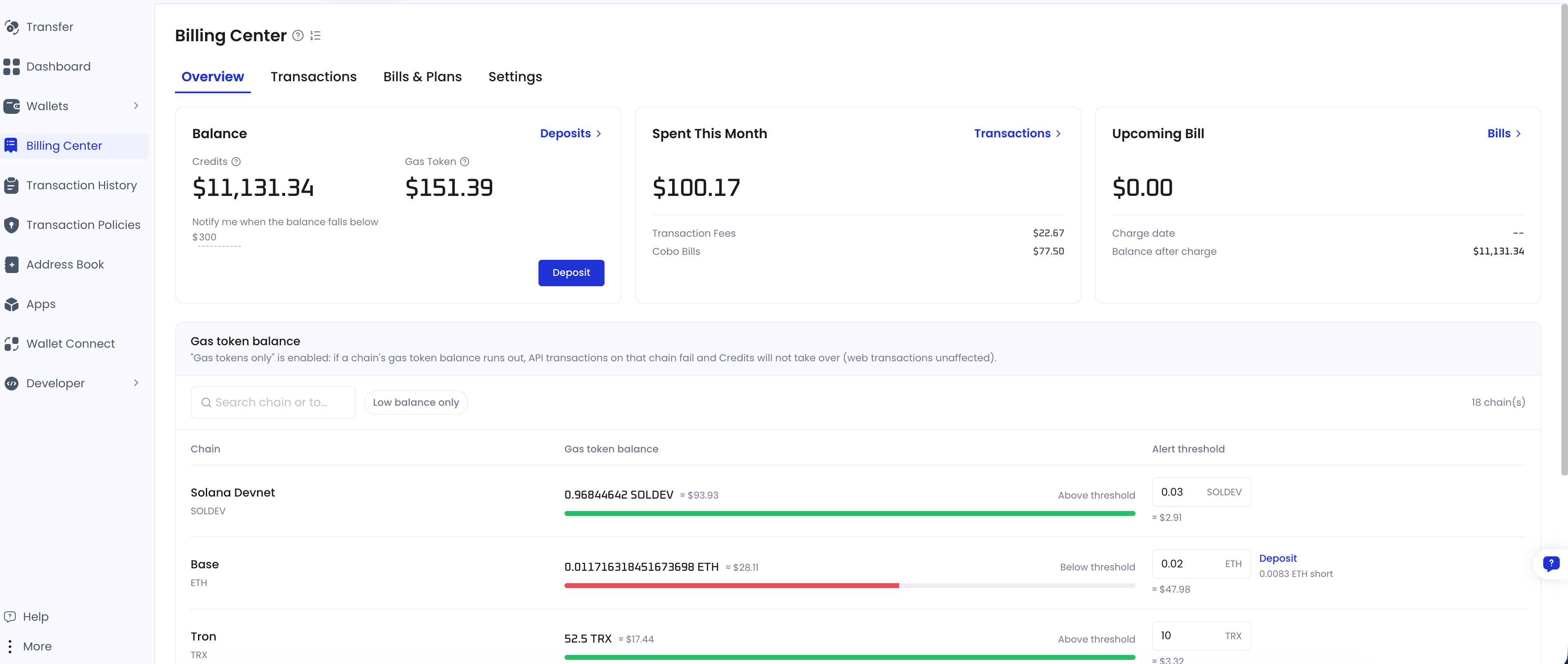
What is Fee Station
On different blockchains, transactions require different native tokens (gas tokens like ETH, TRX, or SOL) to pay for gas fees. This means you need to prepare and manage gas balances for each chain. If any address runs out of gas, transactions may fail. Meanwhile, you might need to settle various types of fees across Cobo Portal, such as service fees and custody fees. These are often handled via emails, spreadsheets, and manual reconciliationโmaking the process inefficient and error-prone. Fee Station helps you simplify this. It is a one-stop fee management platform on Cobo Portal. After Fee Station is enabled, funded, and configured for the chain or request, it can cover on-chain gas fees for supported MPC Wallets or Web3 Wallets transactions in your organization based on the strategy you configure, and also settle various types of fees with a single balance.Currently, Fee Station supports paying gas fees for transactions made with MPC Wallets and Web3 Wallets on EVM-compatible chains, TRON, Solana, and Tempo.
Supported wallet types
Fee Station gas fee payment is available for MPC Wallets and Web3 Wallets only. In the Cobo wallet taxonomy, Web3 Wallets are a subtype of Custodial Wallets. Custodial Wallets also include Asset Wallets, which are not eligible for gas fee payment. Asset Wallets can use the Fee Station balance to settle custody fees only.Who should use Fee Station
Fee Station is ideal for any team looking to simplify on-chain fee management, especially:- Exchanges and wallet service providers: Centrally manage and prepay gas fees for end-user transactions, reducing operational overhead.
- Payment service providers: Use flat-rate or unified billing models to abstract away blockchain complexity and deliver smoother user experiences.
- Enterprise developers using Cobo wallets: Automate fee budgeting, track spending in real time, and receive Webhook alerts for transaction status and balance changes.
What Fee Station can do for you
Automatic gas fee handling
When Fee Station is enabled, funded, and configured for a supported chain or request, it can cover gas fees for transactions initiated from MPC Wallets and Web3 Wallets. You can choose to cover fees only when the wallet balance is insufficient, or to always cover them. Once configured, the system checks the condition and processes the gas fee without manual input. For more details about the chain support, please refer to Supported chains for gas fee payment.How Auto Fueling works
To make sure a withdrawal address can pay its own on-chain fees, Fee Station may send a small amount of the native gas token (for example, on the order of0.001 of the native token) to the address before processing the transaction. The cost of this top-up is deducted from your Fee Station balance. Depending on your configuration and available balances, the deduction may be settled from your USD or USD stablecoin balance even when a native gas token balance is present.
Unified fee settlement
In addition to covering gas fees, your Fee Station balance can also be used to settle all platform-related charges within Cobo Portal, including service fees and custody fees. You donโt need to maintain separate balances for each fee type. A single balance simplifies the billing process and gives you a clear, consolidated view of your spending.Flexible deposit options
You can deposit gas tokens directly, or simply deposit USD or USD stablecoins (such as USDT or USDC) as a unified balance. For transfers that Fee Station covers, it can settle the fee from this balance according to your payment preferences, so you do not need to prepare a separate gas token balance for each chain. For more details about supported gas token or stablecoin types, please refer to Supported token types.TRON gas fee optimization with energy rental
When Fee Station is enabled, funded, and configured for TRON, it can use energy on the TRON network and prioritize energy over burning TRX for gas fees. For transfers that Fee Station covers, it handles eligible energy use according to the configured strategy, so you do not need to rent energy yourself. If Fee Station does not cover a transfer, energy must come from the sending address itself, such as energy the address already holds or has been delegated, or the address must hold TRX to pay the fee. See Pay gas without Fee Station.API and webhook integration
Fee Station offers standardized APIs and webhook support, allowing your system to access real-time fee data and receive timely notifications. This makes monitoring and operations tracking easier and more efficient. For more details, please refer to the Fee Station API and Webhook documentation.Pay gas without Fee Station
You do not have to use Fee Station. If you disable it, or if a transfer is not covered by it, the sending address pays the on-chain fee itself. In that case the sending address must hold the native gas token of the chain it transacts on. On most chains the token you send is not the token that pays the fee. Sending USDC on Ethereum costs ETH; sending USDT on TRON draws on available energy, and burns TRX when energy is insufficient. An address that holds only the token you want to send, with no gas token for that chain, cannot send it.API transfers can decide this per request instead of following the preference saved in Cobo Portal. For the field and its accepted values, see Transfer token in the developer documentation.
Who pays the on-chain fee
Which side pays depends on whether Fee Station is enabled, funded, and applicable to the transfer:
Eligibility depends on the chain, the wallet type, and the payment preference that applies to the sending address. See How to use Fee Station for how to set and inspect preferences, and for how a fee is settled on TRON once Fee Station covers it.