> ## Documentation Index
> Fetch the complete documentation index at: https://manuals.cobo.com/llms.txt
> Use this file to discover all available pages before exploring further.
# Import and set up a Smart Contract Wallet (Safe{Wallet})
> Learn how to import and set up a Smart Contract Wallet (Safe{Wallet}) in Cobo Portal for efficient asset management.
Due to the Bybit security incident, Safe Wallet has suspended third-party delegate call services. As a result, Cobo's Smart Contract Wallets and related services (including on-chain transaction policies) are temporarily unavailable. However, existing wallets and on-chain transaction policies can still be used. Recovery timeline will be announced later.
Only the Operator and Spender have permission to import a Safe\{Wallet}. Cobo Portal currently does not support deleting Safe\{Wallet} once it has been imported.
## Step 1: Import a Safe\{Wallet}
#### If your current email address *is* associated with a Safe\{Wallet} in Cobo Argus
1. Log into [Cobo Portal](https://portal.cobo.com/login).
2. Click **Wallets** in the left sidebar, then select **Smart Contract Wallets**, and click the import button.
3. In the pop-up window, select Safe\{Wallet}.
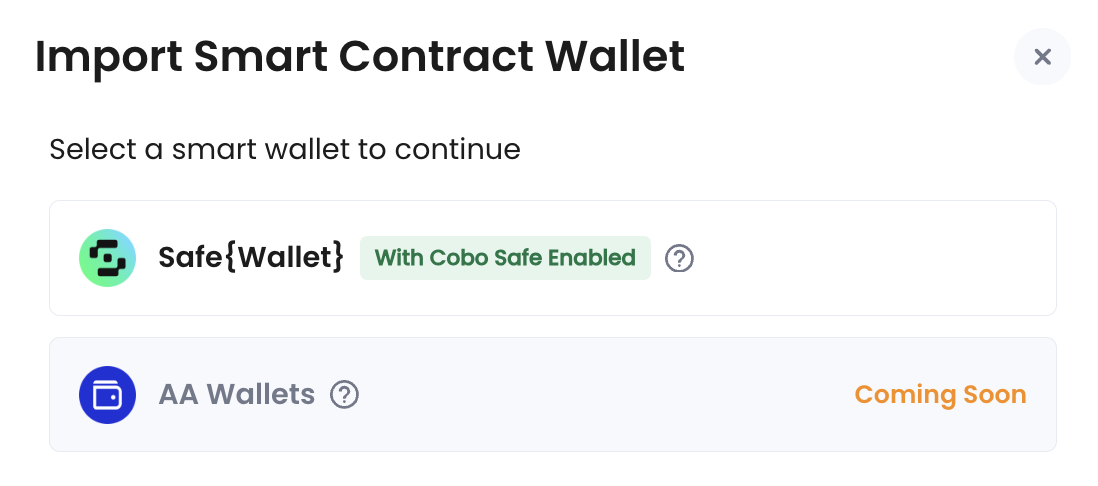 4. Click **Import** to load all Safe\{Wallet} instances with Cobo Safe enabled in Cobo Argus that are associated with your current email address.
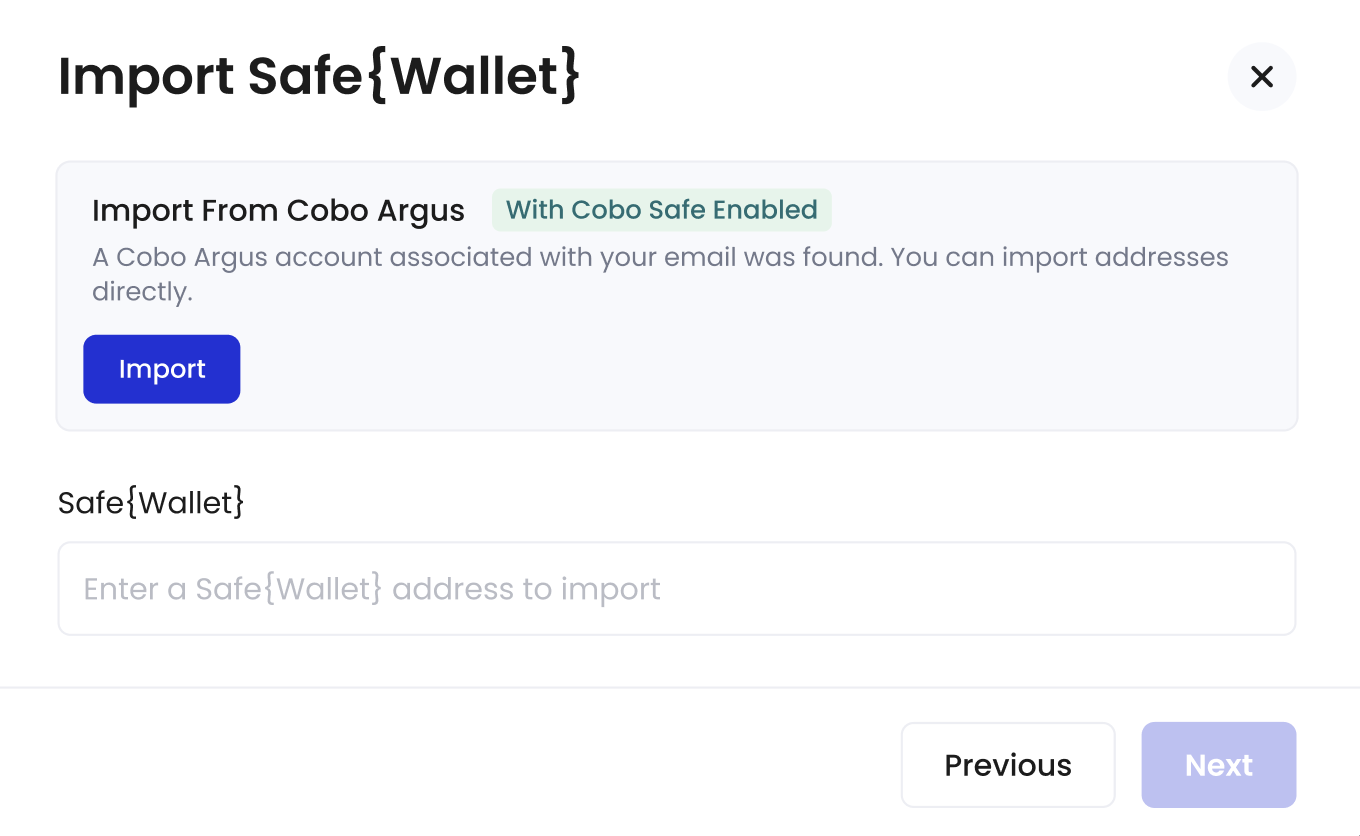 5. Select the Safe\{Wallet} instance you want to import into Cobo Portal. Then, click **Import**.
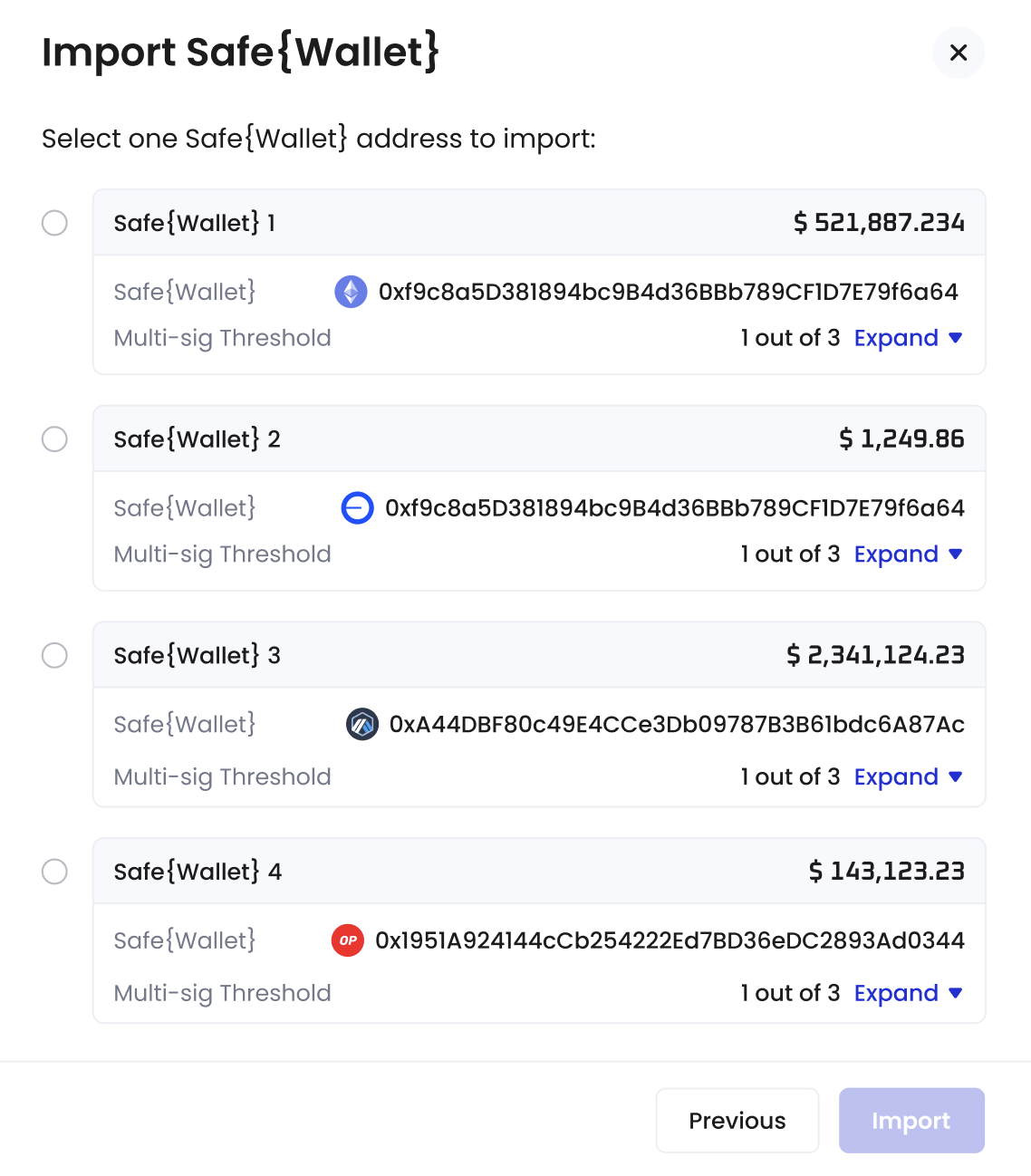 6. You have successfully imported a Safe\{Wallet}. You may now proceed to Step 2.
#### If your current email address *is not* associated with any Safe\{Wallet} in Cobo Argus
1. Log into [Cobo Portal](https://portal.cobo.com/login).
2. Click **Wallets** in the left sidebar, then select **Smart Contract Wallets**, and click the import button.
3. In the pop-up window, select Safe\{Wallet}.
4. Enter the address of the Safe\{Wallet} you want to import into Cobo Portal. Your Safe\{Wallet} instances will load automatically.
6. You have successfully imported a Safe\{Wallet}. You may now proceed to Step 2.
#### If your current email address *is not* associated with any Safe\{Wallet} in Cobo Argus
1. Log into [Cobo Portal](https://portal.cobo.com/login).
2. Click **Wallets** in the left sidebar, then select **Smart Contract Wallets**, and click the import button.
3. In the pop-up window, select Safe\{Wallet}.
4. Enter the address of the Safe\{Wallet} you want to import into Cobo Portal. Your Safe\{Wallet} instances will load automatically.
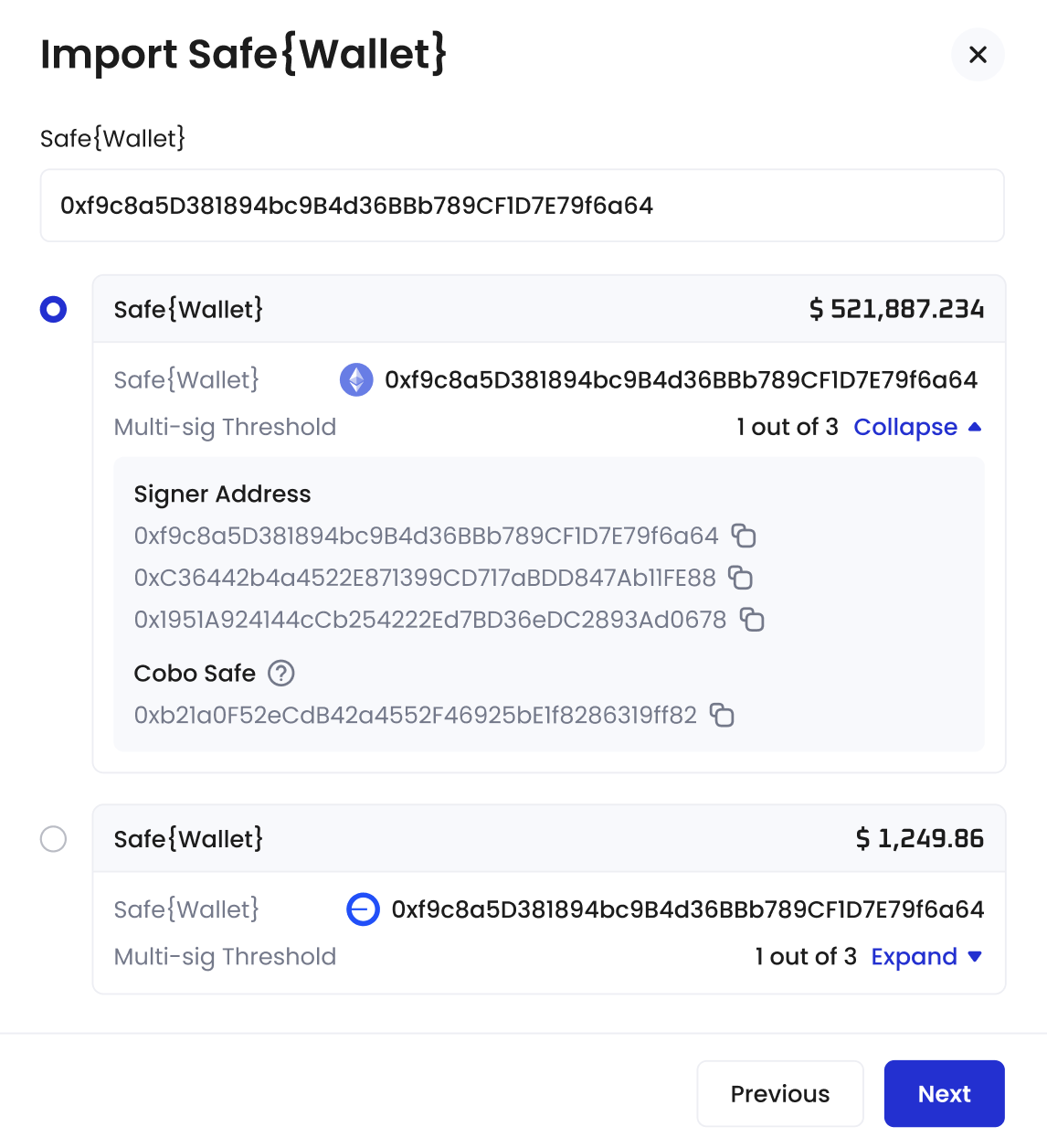 5. Select the Safe\{Wallet} instance you want to import. Then, click **Import**.
6. You have successfully imported a Safe\{Wallet}. You may now proceed to Step 2.
## Step 2: Set up a Delegate Key
The Delegate Key is used to initiate, but not sign, multi-sig transactions on behalf of Safe\{Wallet} signers. It is a dedicated address created and assigned by Cobo.
1. In the pop-up window, click **Set Up**.
5. Select the Safe\{Wallet} instance you want to import. Then, click **Import**.
6. You have successfully imported a Safe\{Wallet}. You may now proceed to Step 2.
## Step 2: Set up a Delegate Key
The Delegate Key is used to initiate, but not sign, multi-sig transactions on behalf of Safe\{Wallet} signers. It is a dedicated address created and assigned by Cobo.
1. In the pop-up window, click **Set Up**.
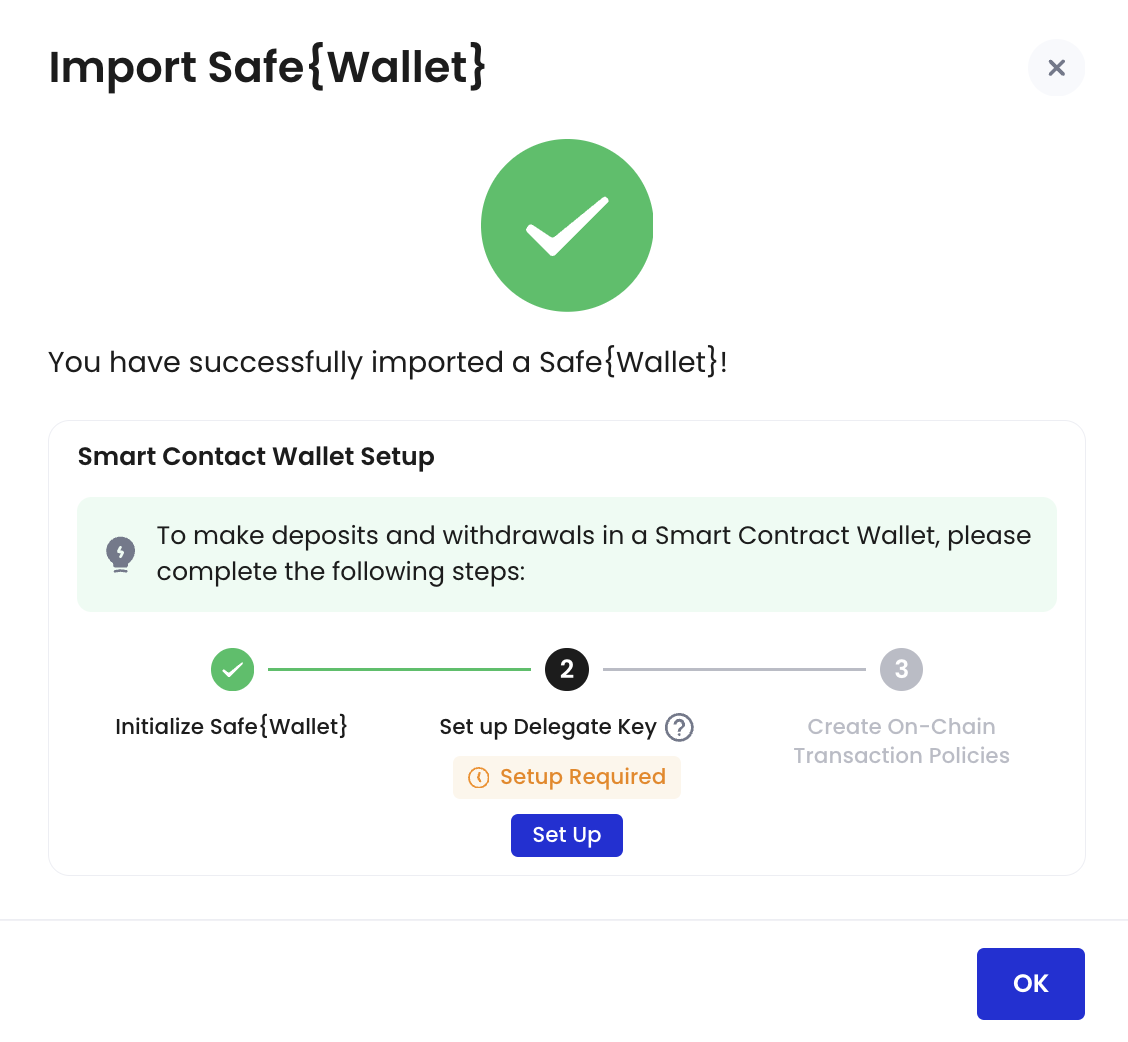 2. Click **Set Up Delegate Key**.
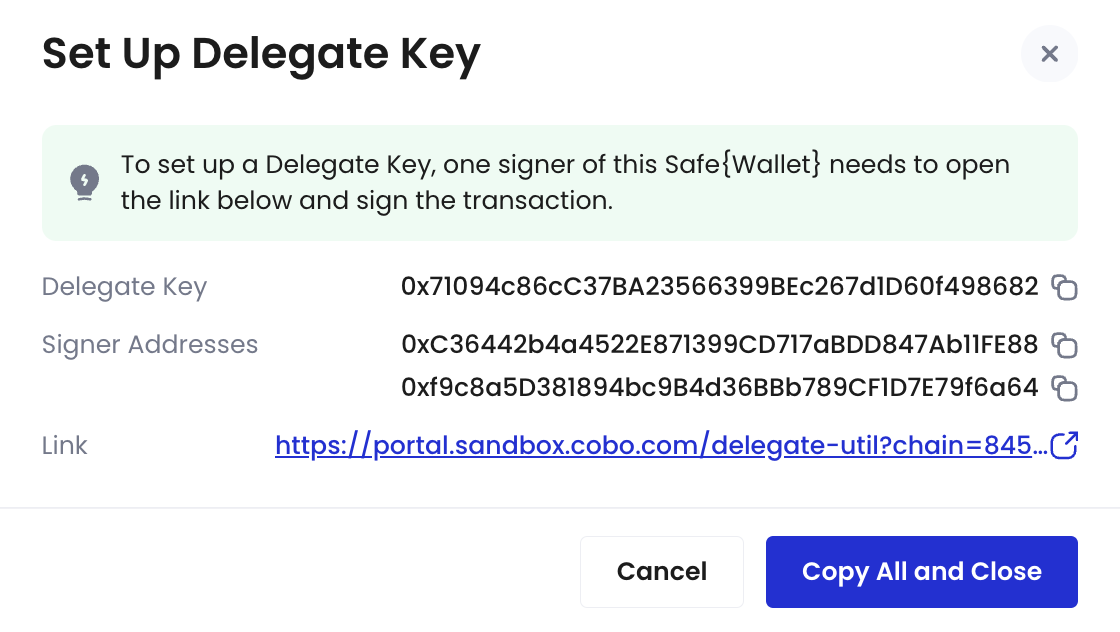
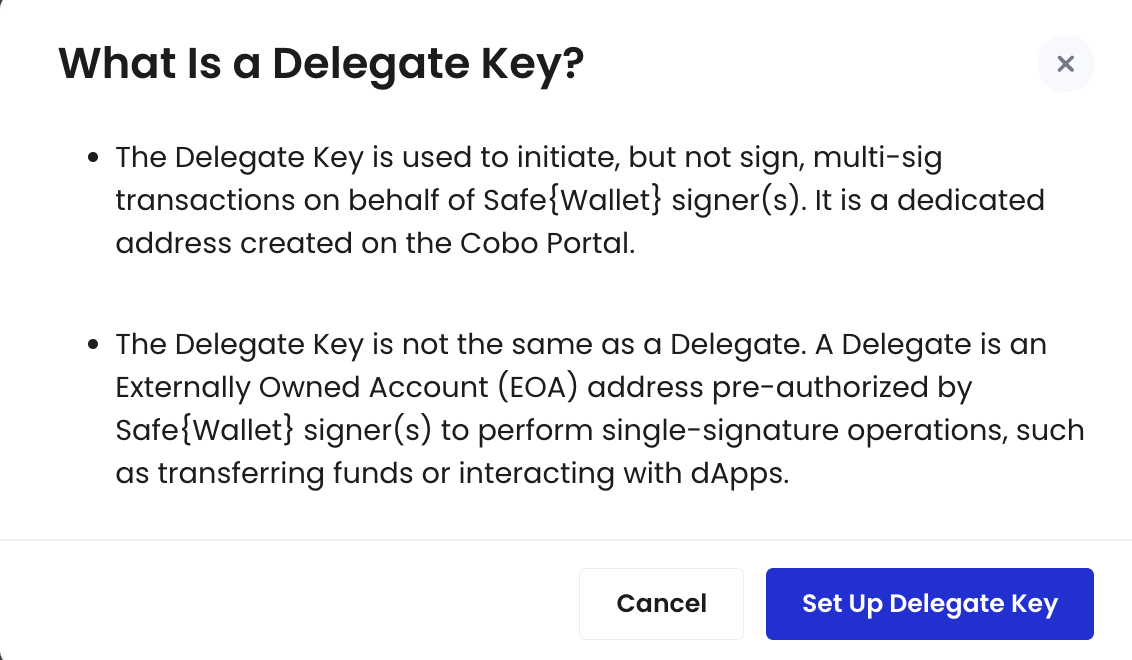 3. If you are not the Safe\{Wallet} signer:
* Click
3. If you are not the Safe\{Wallet} signer:
* Click  to copy the link shown in the pop-up window. Then, send it to any of your Safe\{Wallet} signers to sign.
* Alternatively, click **Copy All and Close** to copy all information, including the Safe\{Wallet} address, Delegate Key, and URL.
to copy the link shown in the pop-up window. Then, send it to any of your Safe\{Wallet} signers to sign.
* Alternatively, click **Copy All and Close** to copy all information, including the Safe\{Wallet} address, Delegate Key, and URL.
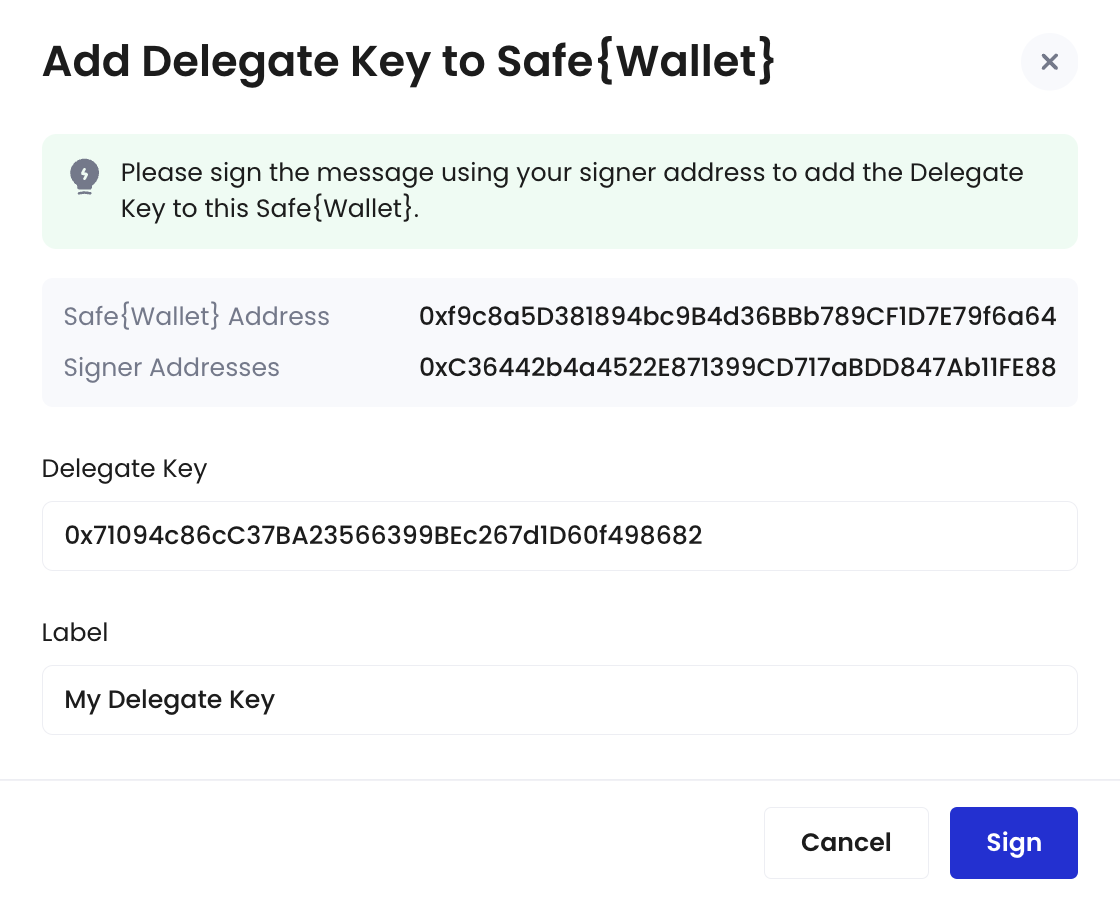
 4. If you are the Safe\{Wallet} signer:
* Navigate to the link provided and connect to your wallet associated with this Safe\{Wallet}.
* In the pop-up window, review the auto-filled fields and enter a label for this Delegate Key. Then, click **Sign Message**.
* Sign a message in your connected wallet.
4. If you are the Safe\{Wallet} signer:
* Navigate to the link provided and connect to your wallet associated with this Safe\{Wallet}.
* In the pop-up window, review the auto-filled fields and enter a label for this Delegate Key. Then, click **Sign Message**.
* Sign a message in your connected wallet.
 5. The new Delegate Key will be displayed on the homepage. You may now proceed to Step 3.
## Step 3: Create an on-chain transaction policy
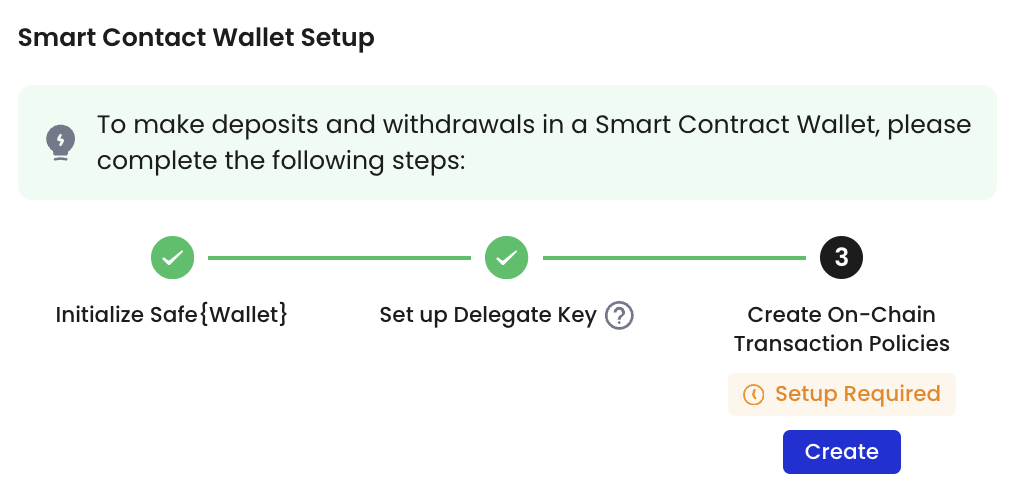
1. On the Smart Contract Wallets homepage, navigate to Status and click **Setup Required** > **Create** next to your Safe\{Wallet}.
5. The new Delegate Key will be displayed on the homepage. You may now proceed to Step 3.
## Step 3: Create an on-chain transaction policy
1. On the Smart Contract Wallets homepage, navigate to Status and click **Setup Required** > **Create** next to your Safe\{Wallet}.
 2. Select the type of on-chain transaction policy you want to create. Note that creating an on-chain transaction policy requires you to select Delegates. Upon successful creation of this on-chain transaction policy, you authorize these Delegates to perform certain tasks (e.g., token transfers, token approvals, contract calls) using a single-signature.
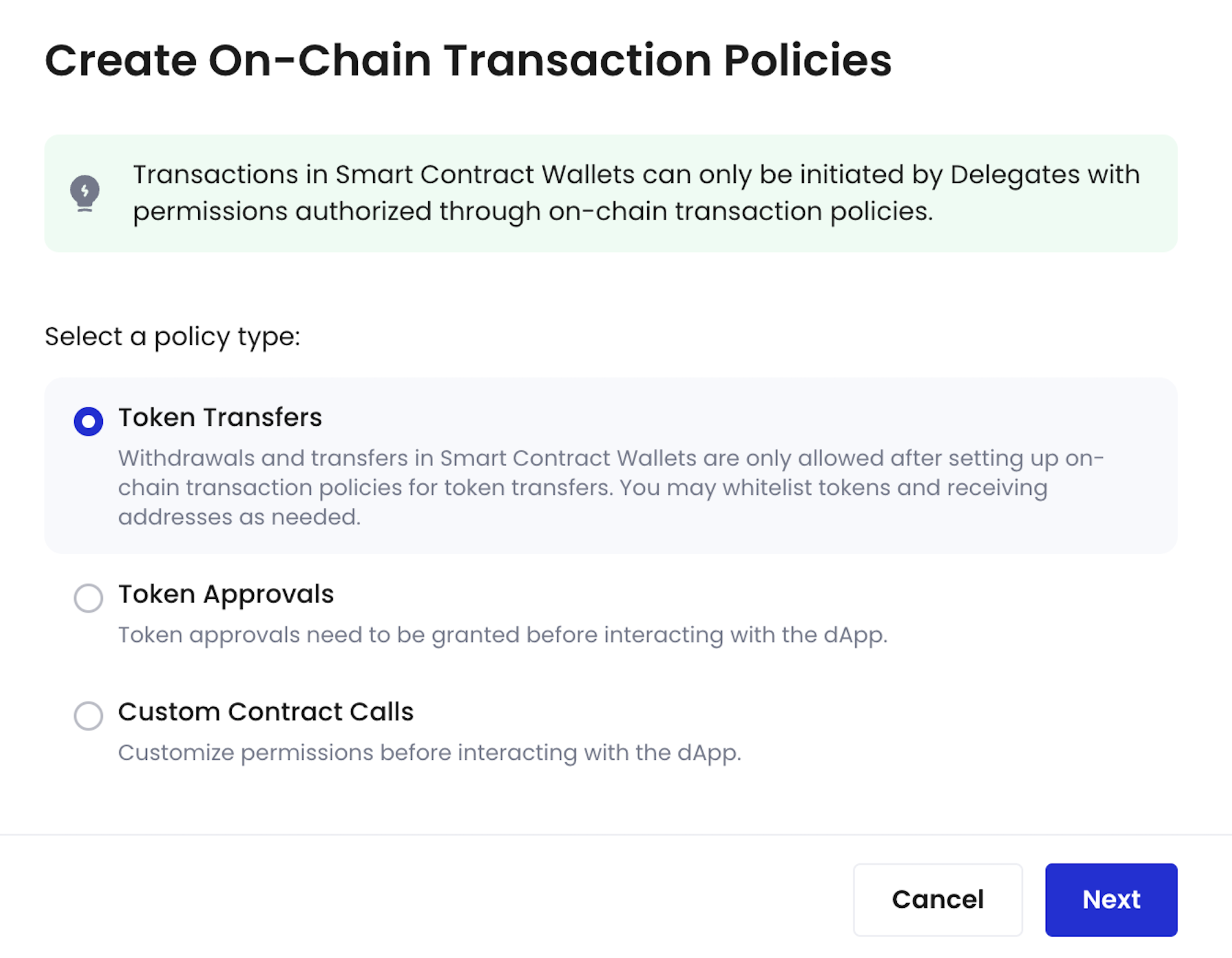 3. Click **Next**.
4. Set up an on-chain transaction policy. For step-to-step guides, refer to [Create contract call policy](/en/portal/risk-controls/create-on-chain-policy).
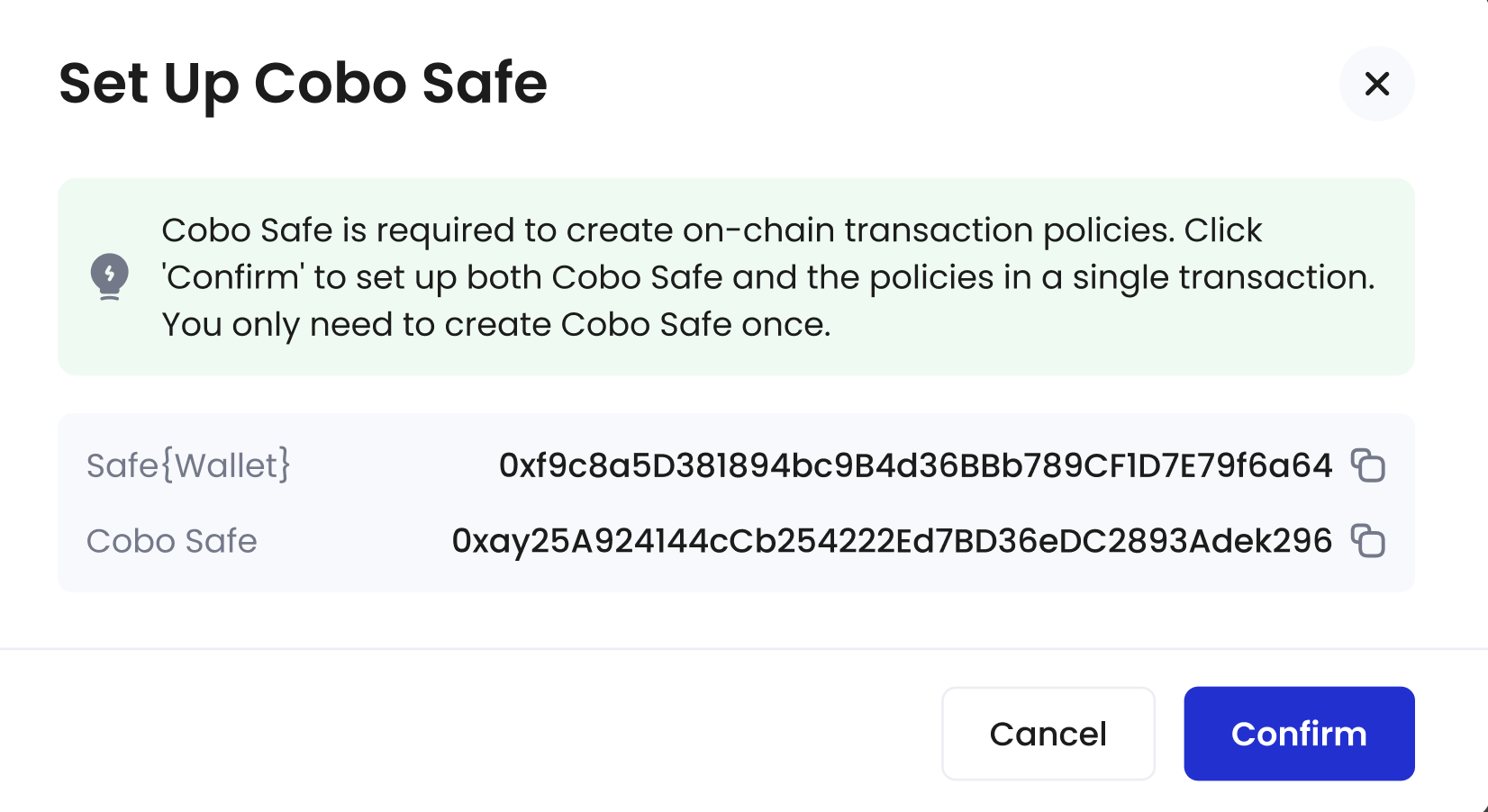
5. (If applicable) If you imported an instance directly from Safe\{Wallet} instead of Cobo Argus, you will be prompted to manually enable Cobo Safe, a smart contract framework that offers delegation and parameter-level access controls. Click **Confirm** to enable Cobo Safe and submit your policy in a single transaction.
3. Click **Next**.
4. Set up an on-chain transaction policy. For step-to-step guides, refer to [Create contract call policy](/en/portal/risk-controls/create-on-chain-policy).
5. (If applicable) If you imported an instance directly from Safe\{Wallet} instead of Cobo Argus, you will be prompted to manually enable Cobo Safe, a smart contract framework that offers delegation and parameter-level access controls. Click **Confirm** to enable Cobo Safe and submit your policy in a single transaction.
 6. Complete the MFA verification.
7. A multi-sig confirmation from Safe\{Wallet} signers is required. Please notify the signers to complete the transaction on Safe\{Wallet}.
8. Once the multi-sig confirmation is complete, return to the Smart Contract Wallets homepage. The status of your Safe\{Wallet} will now be automatically updated to **Ready for use**.
#### What is a Delegate?
Delegate can either be an address from your MPC Wallets (Organization-Controlled), Custodial Wallets (Web3 Wallets), or an EOA address. It is pre-authorized by Safe\{Wallet} signers to perform single-signature operations, such as transferring funds or interacting with dApps. Importantly, the Delegate is responsible for handling gas fees during the execution of single-signature transactions.
6. Complete the MFA verification.
7. A multi-sig confirmation from Safe\{Wallet} signers is required. Please notify the signers to complete the transaction on Safe\{Wallet}.
8. Once the multi-sig confirmation is complete, return to the Smart Contract Wallets homepage. The status of your Safe\{Wallet} will now be automatically updated to **Ready for use**.
#### What is a Delegate?
Delegate can either be an address from your MPC Wallets (Organization-Controlled), Custodial Wallets (Web3 Wallets), or an EOA address. It is pre-authorized by Safe\{Wallet} signers to perform single-signature operations, such as transferring funds or interacting with dApps. Importantly, the Delegate is responsible for handling gas fees during the execution of single-signature transactions.
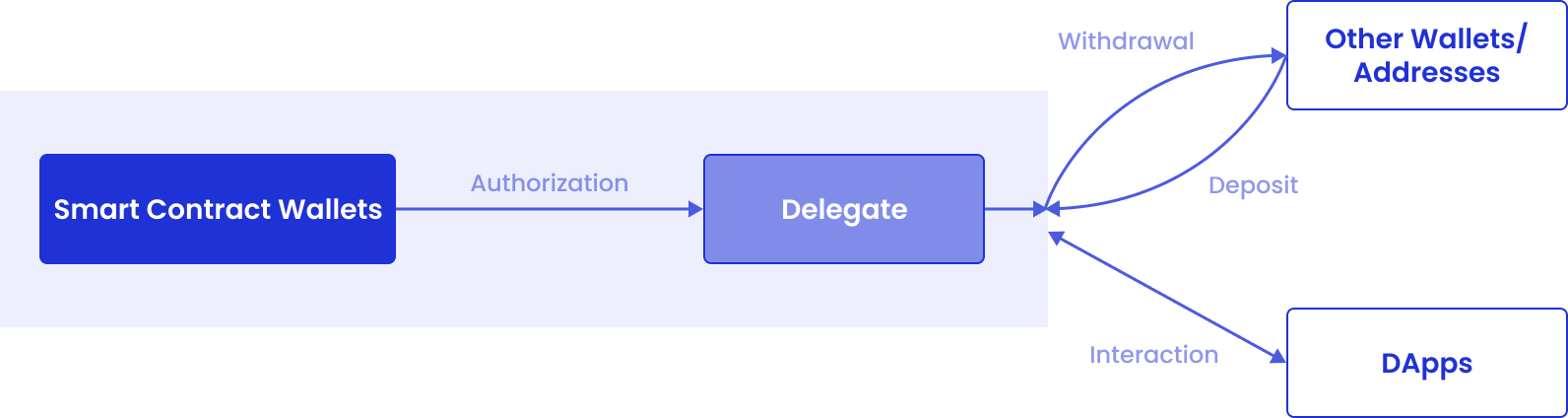 On Cobo Portal, you can set up Delegates by creating on-chain transaction policies for Smart Contract Wallets. The addresses entered during setup will automatically be designated as Delegates for performing single-signature operations.