> ## Documentation Index
> Fetch the complete documentation index at: https://manuals.cobo.com/llms.txt
> Use this file to discover all available pages before exploring further.
# Wallet management
> Step-by-step guide to managing wallets in User-Controlled Wallets, including creation and transaction management.
## Overview
A project is a collection of vaults, and a vault is a collection of wallets. See [Object model](/en/portal/mpc-wallets/ucw/object-model).
## Create a wallet
A wallet can only be created using the [WaaS 2.0 API](https://www.cobo.com/developers/v2/guides/overview/introduction). To create a wallet, see **Create a wallet and an address** on [Get started with MPC Wallets (User-Controlled Wallets)](https://www.cobo.com/developers/v2/guides/mpc-wallets/get-started-ucw#1-complete-the-initial-setup).
## Manage a wallet
Follow these instructions to manage a specific wallet.
1. Log in to [Cobo Portal](https://portal.cobo.com/login).
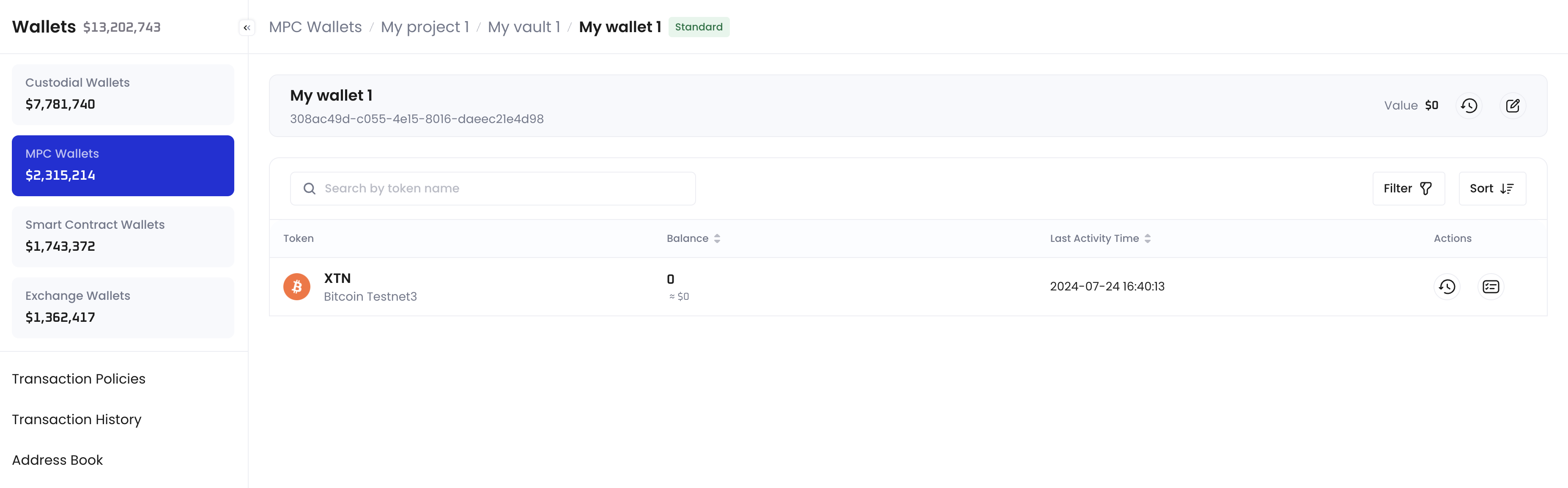
2. Click **Wallets** in the left sidebar, then select **MPC Wallets** > **User-Controlled Projects**, click a project to open its own management page, click a vault to open its own management page, then click a wallet to enter its management page.
On the wallet's management page, you can click **View Transactions**  next to **Value** to view all the transactions related to this wallet. You can also click **Edit Wallet Name**
  to change its name.
For each token type in your wallet, you can click **Transactions** to view the transactions in this wallet using that token type. You can also click **View Deposit Addresses**
to change its name.
For each token type in your wallet, you can click **Transactions** to view the transactions in this wallet using that token type. You can also click **View Deposit Addresses**  to manage the deposit addresses of that token type in your wallet.