> ## Documentation Index
> Fetch the complete documentation index at: https://manuals.cobo.com/llms.txt
> Use this file to discover all available pages before exploring further.
# Billing Center overview
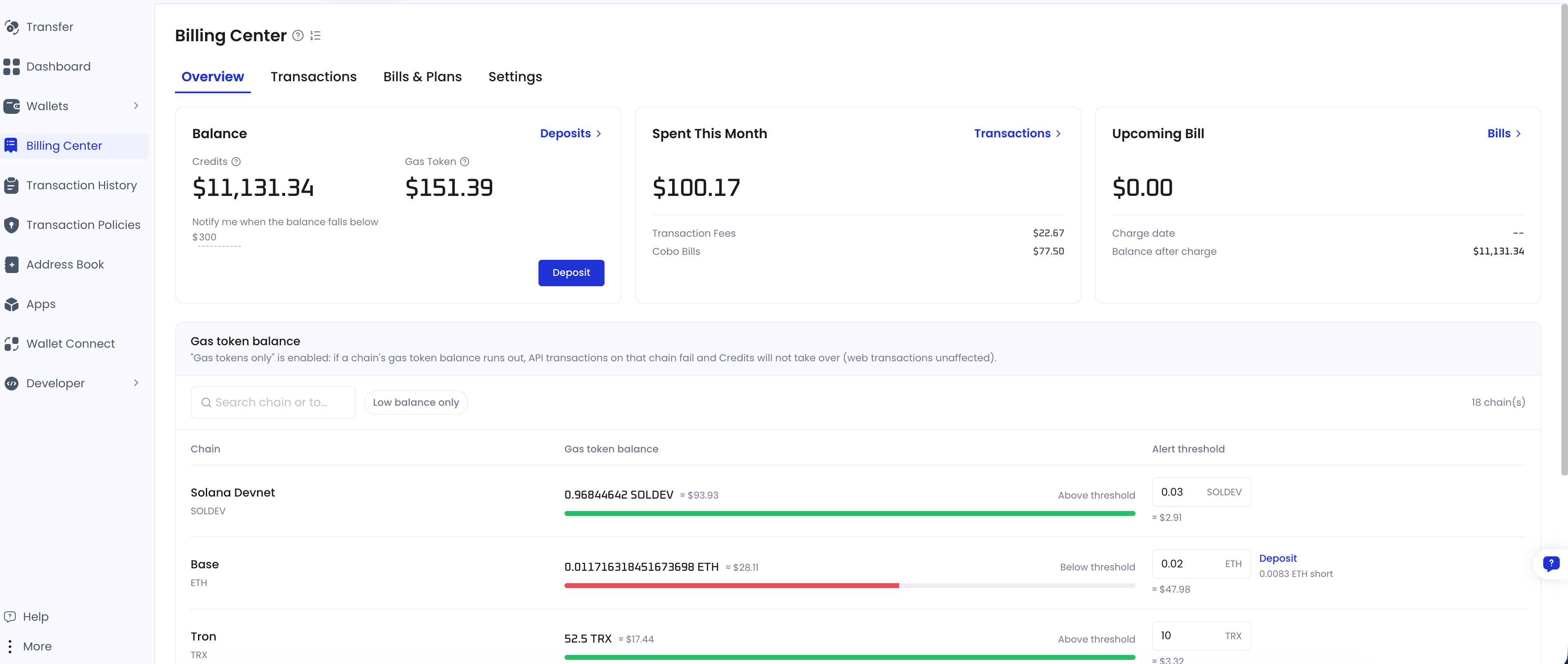
> Billing Center is the single place in Cobo Portal where you fund your organization and pay both on-chain transaction fees and Cobo bills.
## Why Billing Center exists
Running an organization on Cobo Portal produces two kinds of cost, and they work very differently.
**On-chain transaction fees.** Every on-chain transaction incurs a fee, and the token used to pay it is usually not the token you are sending: sending USDC on Ethereum costs ETH; sending USDT on TRON consumes energy and burns TRX when energy runs short. Tokens used specifically to pay on-chain fees are called **gas tokens**. The moment a wallet address runs out of the chain's gas token, **the transaction fails**.
Handling this yourself means keeping a balance on every chain and every address, and watching all of them for depletion.
**Cobo's monthly bill.** Your plan subscription and any usage beyond it are billed monthly.
**Billing Center brings both together.** You maintain a single balance in Billing Center (**Credits**), and Cobo deducts on-chain fees and monthly bills from it — no per-chain funding, no manual reconciliation.
## What fee sponsorship means
When a wallet address does not hold enough of a chain's gas token to pay the fee, **Billing Center pays it for that transaction**. That is fee sponsorship.
The transaction goes out as normal and the cost is deducted from your Billing Center balance. This means your operating wallet addresses **do not need to hold any gas tokens** to transact.
Fee sponsorship covers transactions from MPC Wallets and Custodial Wallets (Web3 Wallets) on EVM-compatible chains, TRON, Solana, and Tempo. Other chains, such as BTC, are not supported — on those chains the wallet address must hold the fee itself.
## The two balances
Billing Center holds two kinds of balance. What separates them is **what each one can pay for**:
| | Credits | Gas tokens |
| ---------- | ----------------------------------------------------------------------------------- | ------------------------------------------------------------- |
| What it is | The balance you deposit into Billing Center, funded with USDT, USDC, or USD | The token each chain charges its fees in, deposited per chain |
| Pays for | Transaction fees on any supported chain, Cobo monthly bills, and add-on plan quotas | Transaction fees on its own chain only |
| Required? | **Yes.** Credits alone are enough for day-to-day operation | Optional, and off by default |
Credits alone are enough to operate. Gas tokens are optional — enable them only if you want a chain's fees charged to that chain's own token instead of Credits.
For details, see [Balances and how fees are charged](/en/portal/billing-center/balances-and-fees).
## Before you start
Log in to [Cobo Portal](https://portal.cobo.com/login) and click **Billing Center** in the left navigation menu.
 Billing Center was formerly called **Fee Station**. They are the same product, and some APIs still use the old name.
## Next steps
* [Initial setup](/en/portal/billing-center/get-started) — the two things to do for a new organization.
* [Balances and how fees are charged](/en/portal/billing-center/balances-and-fees) — the deduction order, and how Portal and API transactions differ.
Billing Center was formerly called **Fee Station**. They are the same product, and some APIs still use the old name.
## Next steps
* [Initial setup](/en/portal/billing-center/get-started) — the two things to do for a new organization.
* [Balances and how fees are charged](/en/portal/billing-center/balances-and-fees) — the deduction order, and how Portal and API transactions differ.