> ## Documentation Index
> Fetch the complete documentation index at: https://manuals.cobo.com/llms.txt
> Use this file to discover all available pages before exploring further.
# Swap a token
> Learn how to use the swap feature of the Token Swap app.
This guide walks you through how to use the swap feature.
Currently, cross-chain swaps are not supported. To move assets across chains, please use the [Bridge](/en/apps/token-swap/bridge/introduction) feature.
## Prerequisites
* You have installed Token Swap as described in [Browse and install apps](/en/apps/browse-and-install).
* You have been assigned the [Spender](/en/portal/risk-controls/roles-and-permissions) role or a role with equivalent permissions.
* You are swapping a token from a [Custodial Wallet](/en/portal/custodial-wallets/introduction) or [MPC Wallet](/en/portal/mpc-wallets/introduction).
* The involved wallet has been selected in the wallet scope for the Token Swap app. Refer to Step 5 in [Browse and install apps](/en/apps/browse-and-install).
* The token you are swapping is a supported token type. See the [Supported Assets](/en/apps/token-swap/swap/supported-assets) list for details.
## Steps
1. Click **Apps** in the left sidebar of Cobo Portal, find Token Swap, and then click **Open**.
2. Click the **Swap** tab to display the following page.
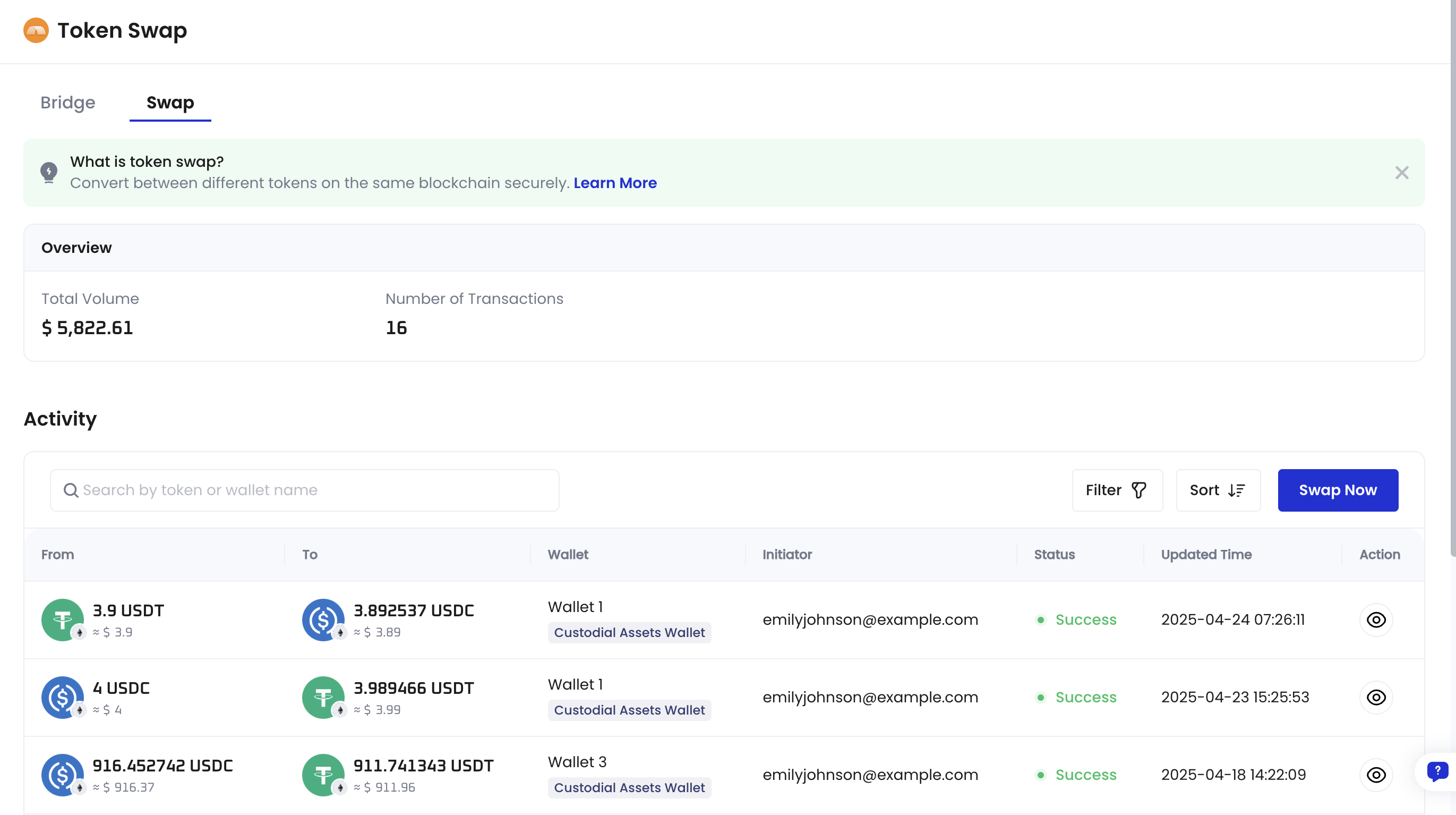 3. Click **Swap Now** to open the **Swap** dialog.
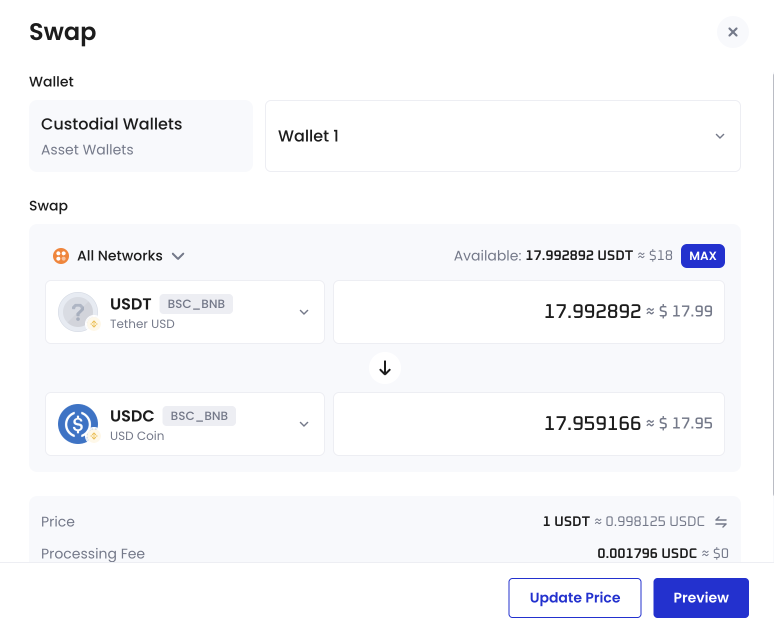 4. Select the wallet, choose the source and destination tokens, and enter the amount to swap.
If your wallet or token does not appear in the list, make sure the wallet is selected in the wallet scope for Token Swap and that the token is a supported token type.
5. Review the quoted price, processing fee, and estimated time. Then click **Preview**.
6. Confirm the details and click **Submit** to complete the request.
Once submitted, the swap request cannot be cancelled.
Your swap request has been submitted. It will be processed by Cobo, and settlement may take some time depending on network conditions and available liquidity. You can check the status of your swap request in the **Activity** table within the app.
## Supported Swap Pairs
The swap function is restricted to designated pairs on specific blockchains.
For details, please see [Supported Assets](/en/apps/token-swap/swap/supported-assets)
4. Select the wallet, choose the source and destination tokens, and enter the amount to swap.
If your wallet or token does not appear in the list, make sure the wallet is selected in the wallet scope for Token Swap and that the token is a supported token type.
5. Review the quoted price, processing fee, and estimated time. Then click **Preview**.
6. Confirm the details and click **Submit** to complete the request.
Once submitted, the swap request cannot be cancelled.
Your swap request has been submitted. It will be processed by Cobo, and settlement may take some time depending on network conditions and available liquidity. You can check the status of your swap request in the **Activity** table within the app.
## Supported Swap Pairs
The swap function is restricted to designated pairs on specific blockchains.
For details, please see [Supported Assets](/en/apps/token-swap/swap/supported-assets)