> ## Documentation Index
> Fetch the complete documentation index at: https://manuals.cobo.com/llms.txt
> Use this file to discover all available pages before exploring further.
# 提币
> 掌握如何从智能合约钱包中提取资产,确保交易的安全性。
由于 Bybit 安全事件,Safe Wallet 已暂停所有第三方 Delegate Call 服务。因此,Cobo 的智能合约钱包和相关服务(包括链上交易风控规则)暂时不可用。此前已经创建的钱包和链上交易风控规则仍然可以继续使用。恢复时间将另行通知。
前提条件:从智能合约钱包提币前, 请确保您已经成功[创建](/cn/portal/smart-contract-wallets/create)或者[导入](/cn/portal/smart-contract-wallets/import)了智能合约钱包,设置了用于代币转账的[链上交易风控规则](/cn/portal/risk-controls/on-chain-tx-type),设置了[链下交易风控规则](/cn/portal/risk-controls/off-chain-tx-set-transfer)(建议), 并且已经向钱包内进行[充币](/cn/portal/smart-contract-wallets/deposit-assets)。
#### 按照代币类型进行提币
1. 在 Cobo Portal 中点击进入一个智能合约钱包,并切换到**资产**标签页。
2. 要提取特定代币,请点击相应代币(例如 ETH)旁边的  。
3. 在弹出窗口中,检查**代币**类型和**出金钱包/地址**的默认填写内容。
4. 选择 **Delegate** 地址并输入您的**接收地址**。请注意,Delegate 只能将授权的代币提取到在设置代币转账链上交易风控规则时指定的接收地址。有关更多信息,请参考[创建链上合约交互风控规则](/cn/portal/risk-controls/create-on-chain-policy)。
5. 输入提币金额,并查看交易费用。
6. (可选)输入交易分类和描述。
。
3. 在弹出窗口中,检查**代币**类型和**出金钱包/地址**的默认填写内容。
4. 选择 **Delegate** 地址并输入您的**接收地址**。请注意,Delegate 只能将授权的代币提取到在设置代币转账链上交易风控规则时指定的接收地址。有关更多信息,请参考[创建链上合约交互风控规则](/cn/portal/risk-controls/create-on-chain-policy)。
5. 输入提币金额,并查看交易费用。
6. (可选)输入交易分类和描述。
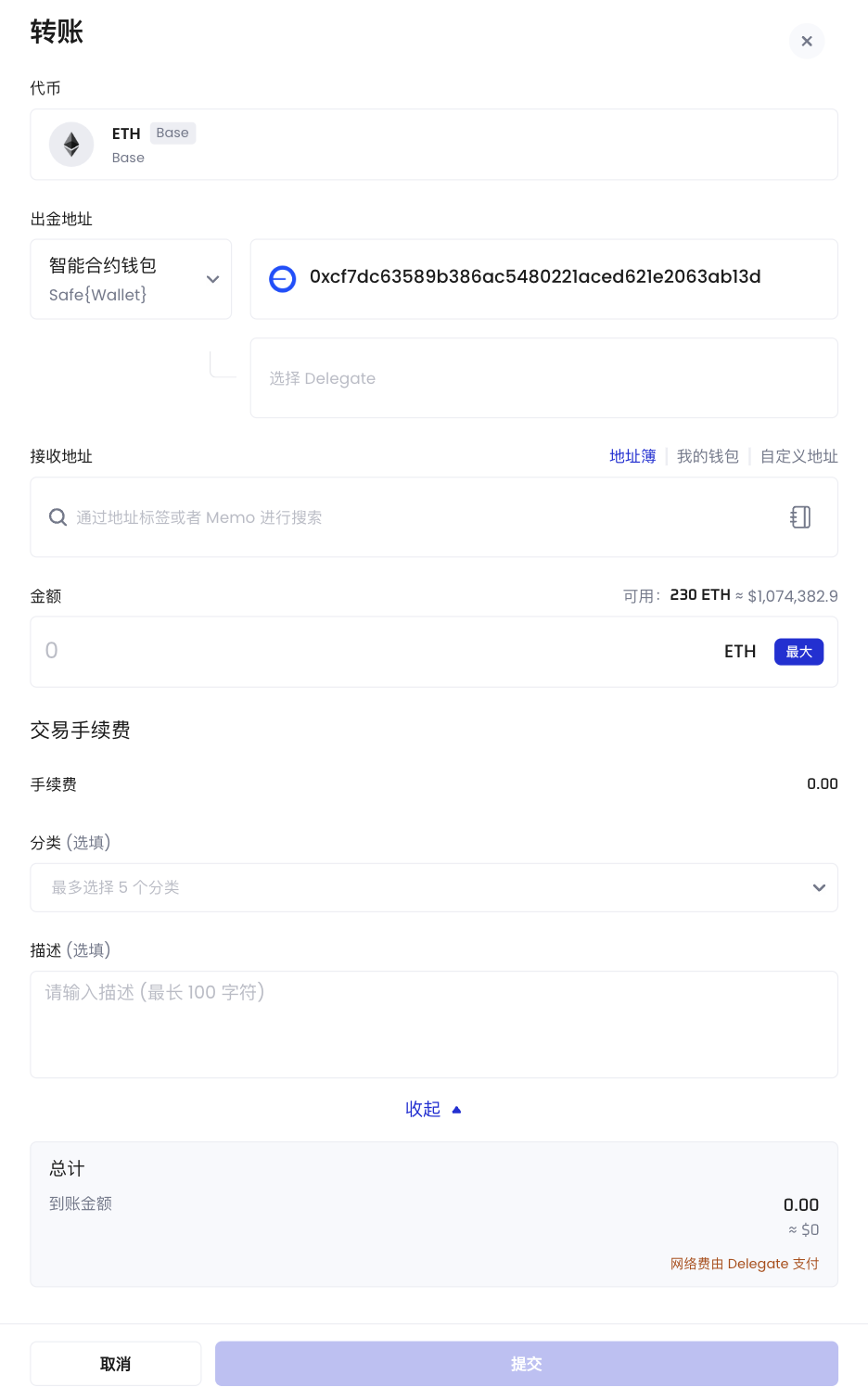 7. 点击**提交**。
#### 直接从 Safe\{Wallet} 提币
1. 要直接从您的 Safe\{Wallet} 提币,请点击**资产总额**旁边的 。
7. 点击**提交**。
#### 直接从 Safe\{Wallet} 提币
1. 要直接从您的 Safe\{Wallet} 提币,请点击**资产总额**旁边的 。
 2. 在弹出窗口中,检查**出金钱包/地址**的默认填写内容。
3. 选择 **Delegate** 地址,输入您要提取的**代币**类型和**接收地址**。请注意,Delegate 只能将授权的代币提取到在设置代币转账链上交易风控规则时指定的接收地址。有关更多信息,请参考[创建链上合约交互风控规则](/cn/portal/risk-controls/create-on-chain-policy)。
4. 输入提币金额,并查看交易费用。
5. (可选)输入交易分类和描述。
6. 点击**提交**。
#### 通过转账模块进行提币
更多详情请参考[从智能合约钱包转账](/cn/portal/transfers/from-smart-contract-wallets)。
2. 在弹出窗口中,检查**出金钱包/地址**的默认填写内容。
3. 选择 **Delegate** 地址,输入您要提取的**代币**类型和**接收地址**。请注意,Delegate 只能将授权的代币提取到在设置代币转账链上交易风控规则时指定的接收地址。有关更多信息,请参考[创建链上合约交互风控规则](/cn/portal/risk-controls/create-on-chain-policy)。
4. 输入提币金额,并查看交易费用。
5. (可选)输入交易分类和描述。
6. 点击**提交**。
#### 通过转账模块进行提币
更多详情请参考[从智能合约钱包转账](/cn/portal/transfers/from-smart-contract-wallets)。