> ## Documentation Index
> Fetch the complete documentation index at: https://manuals.cobo.com/llms.txt
> Use this file to discover all available pages before exploring further.

# 编辑业务风控

> 学习如何编辑业务风控，确保团队的审批规则和透明度。

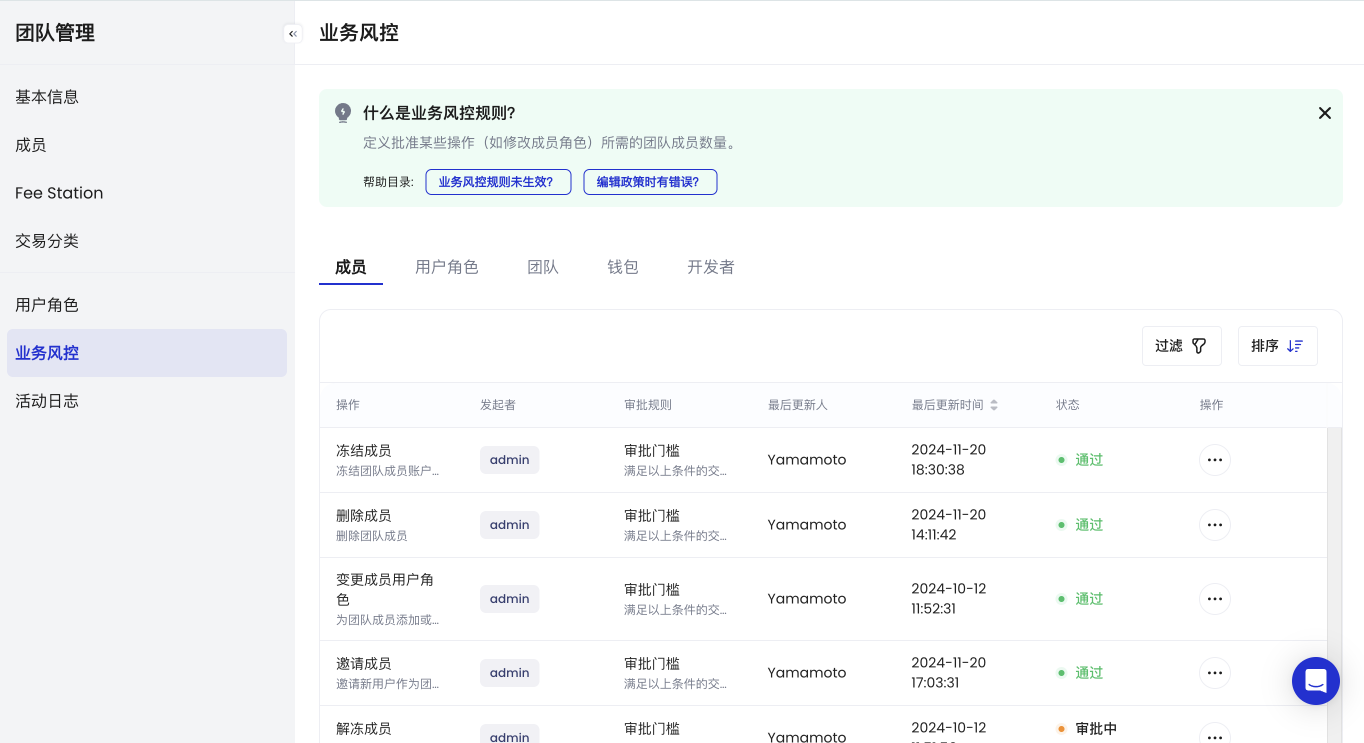
您可以编辑每个业务风控来执行定制的审批规则。以下是您可选择用于每个业务风控的审批规则列表。
<table class="table">
  <thead>
    <tr>
      <th><strong>审批规则</strong></th>
      <th><strong>描述</strong></th>
    </tr>
  </thead>

  <tbody>
    <tr>
      <td><strong>自动拒绝</strong></td>
      <td>操作会被立即拒绝，无需审批</td>
    </tr>

    <tr>
      <td><strong>自动通过</strong></td>
      <td>操作会被立即通过，无需审批</td>
    </tr>

    <tr>
      <td rowspan="2"><strong>审批门槛</strong></td>
      <td>选择一组审批员，并设置一个 N/T 的审批门槛（例如，3 位审批员中需有 2 位批准后才能处理操作）</td>
    </tr>

    <tr>
      <td>审批员可以是特定用户或用户角色</td>
    </tr>

    <tr>
      <td><strong>自定义工作流</strong></td>
      <td>创建自定义工作流，提升您操作策略的灵活性</td>
    </tr>
  </tbody>
</table>

要编辑业务风控，请按照以下步骤操作：

1. 登录 [Cobo Portal](https://portal.cobo.com/login)。

2. 点击右上角的个人头像，选择**团队**。

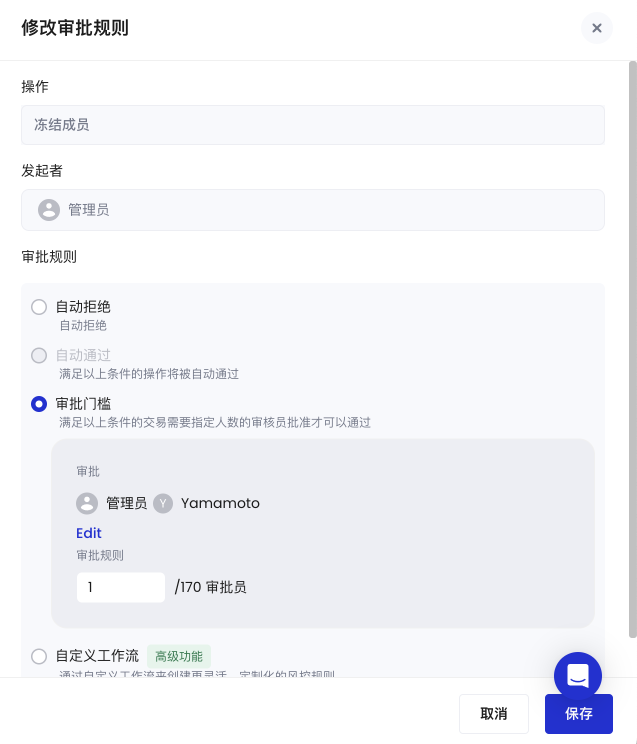
3. 点击**业务风控**标签页。

   <img src="https://mintcdn.com/cobo-6/Rpl03eKvhBs4KGya/cn/images/organization/overview.png?fit=max&auto=format&n=Rpl03eKvhBs4KGya&q=85&s=abab9397891cfacd6b7a1499f901d62a" className="screenshot_full_screen" alt="业务风控标签页" width="1364" height="743" data-path="cn/images/organization/overview.png" />

4. 将鼠标悬停在**操作**列中的更多图标 <img src="https://mintcdn.com/cobo-6/eimeCYgrMbEMHX5M/cn/images/common/icon_more.svg?fit=max&auto=format&n=eimeCYgrMbEMHX5M&q=85&s=dcd4e0a4a2763dfb63b3cd1794f24f46" className="icon" alt="更多图标" width="34" height="34" data-path="cn/images/common/icon_more.svg" /> 上，然后选择 <img src="https://mintcdn.com/cobo-6/eimeCYgrMbEMHX5M/cn/images/common/icon_edit.svg?fit=max&auto=format&n=eimeCYgrMbEMHX5M&q=85&s=4f476337fbd73ee9a24e0295b9b2bcc7" className="icon" alt="编辑图标" width="34" height="34" data-path="cn/images/common/icon_edit.svg" /> 编辑图标以打开**修改审批规则**面板。

   <img src="https://mintcdn.com/cobo-6/Rpl03eKvhBs4KGya/cn/images/organization/edit.png?fit=max&auto=format&n=Rpl03eKvhBs4KGya&q=85&s=f639bf6400ded54b0e04966daf0d74bd" className="screenshot_full_screen" alt="修改审批规则面板" width="637" height="744" data-path="cn/images/organization/edit.png" />

5. 更新审批规则。

6. 点击**保存**。