> ## Documentation Index
> Fetch the complete documentation index at: https://manuals.cobo.com/llms.txt
> Use this file to discover all available pages before exploring further.

# 钱包管理

> 学习如何管理终端用户钱包，确保资产的高效和安全使用。

## 概览

项目是由多个 Vault 组成的集合，而 Vault 是由多个钱包组成的集合。请参阅[对象模型](/cn/portal/mpc-wallets/ucw/object-model)。

## 创建钱包

钱包只能通过 [WaaS 2.0 API](https://www.cobo.com/developers/v2_cn/guides/overview/introduction) 创建。要创建钱包，请参阅 [Get started with MPC Wallets (User-Controlled Wallets)](https://www.cobo.com/developers/v2_cn/guides/mpc-wallets/get-started-ucw#2-create-a-wallet-and-an-address) 中的 **Create a wallet and an address**。

## 管理钱包

按照以下说明管理特定的钱包。

1. 登录到 [Cobo Portal](https://portal.cobo.com/login)。
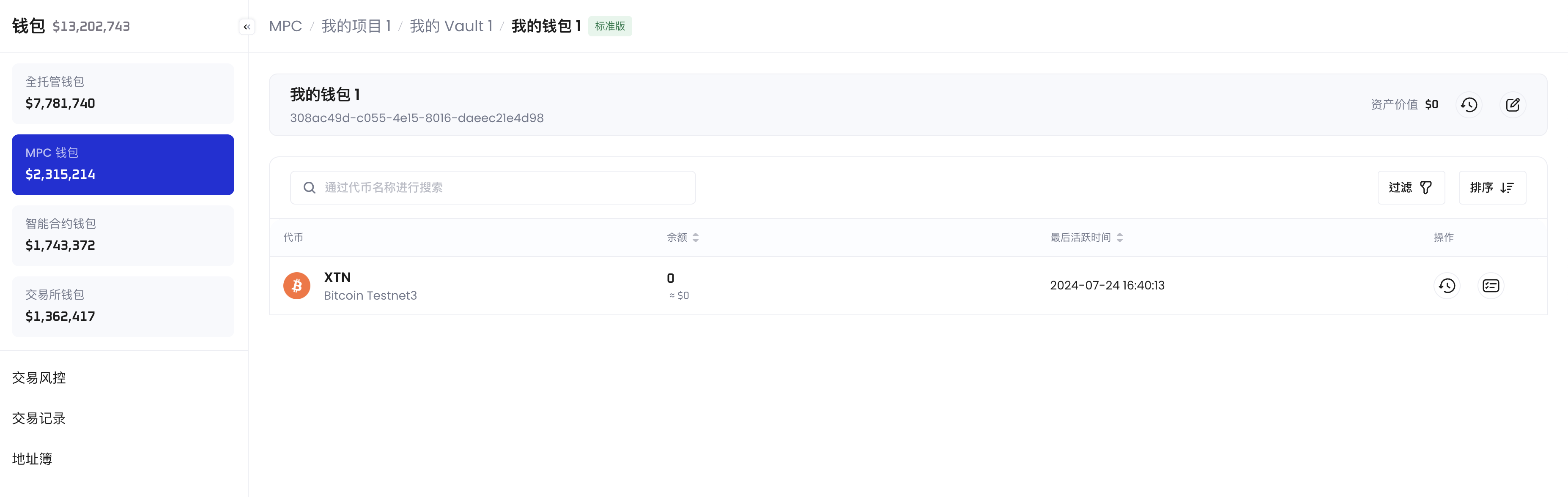
2. 点击左侧导航栏中的**钱包**，然后选择 **MPC 钱包** > **终端用户钱包**，点击一个项目以打开其管理页面，再点击一个 Vault 以打开其管理页面，然后点击一个钱包进入其管理页面。

在钱包的管理页面中，您可以点击**查看交易记录** <img src="https://mintcdn.com/cobo-6/iUEIXAPu2nP-33wJ/en/images/common/icon_view%20transactions.svg?fit=max&auto=format&n=iUEIXAPu2nP-33wJ&q=85&s=a99ff910ddfddd9aa1a2d13138be9156" className="icon" width="34" height="34" data-path="en/images/common/icon_view transactions.svg" /> 查看与此钱包相关的所有交易记录。您还可以点击**编辑钱包名称** <img src="https://mintcdn.com/cobo-6/iUEIXAPu2nP-33wJ/en/images/common/icon_edit.svg?fit=max&auto=format&n=iUEIXAPu2nP-33wJ&q=85&s=7a29d417f8ab29d73a33b4f5adfd8571" className="icon" width="34" height="34" data-path="en/images/common/icon_edit.svg" /> 更改其名称。

对于钱包中的每种代币类型，您可以点击**交易记录** <img src="https://mintcdn.com/cobo-6/iUEIXAPu2nP-33wJ/en/images/common/icon_view%20transactions.svg?fit=max&auto=format&n=iUEIXAPu2nP-33wJ&q=85&s=a99ff910ddfddd9aa1a2d13138be9156" className="icon" width="34" height="34" data-path="en/images/common/icon_view transactions.svg" /> 查看该代币类型的交易记录。您还可以点击**查看收币地址** <img src="https://mintcdn.com/cobo-6/iUEIXAPu2nP-33wJ/en/images/common/icon_view_deposit_addresses.svg?fit=max&auto=format&n=iUEIXAPu2nP-33wJ&q=85&s=e1e16247f34eaa6e9d6bd6e05a190d32" className="icon" width="32" height="32" data-path="en/images/common/icon_view_deposit_addresses.svg" /> 管理钱包中该代币类型的收币地址。

<img src="https://mintcdn.com/cobo-6/Rpl03eKvhBs4KGya/cn/images/mpc-wallet/ucw/wallet-management.png?fit=max&auto=format&n=Rpl03eKvhBs4KGya&q=85&s=e794dac7d2d7657abdefaf71e23e45eb" className="screenshot_full_screen" alt="展示钱包管理页面的图像" width="3708" height="1176" data-path="cn/images/mpc-wallet/ucw/wallet-management.png" />