> ## Documentation Index
> Fetch the complete documentation index at: https://manuals.cobo.com/llms.txt
> Use this file to discover all available pages before exploring further.
# 生成 Gate.io API key
> 学习如何创建 Gate API Key,确保安全地访问交易服务。
当您将 Gate.io 账户关联到交易所钱包时,需要提供 API key 和 secret key。此外,还需要将 Cobo 加入 IP 白名单,并为 API key 分配特定权限。
本文介绍如何在 Gate.io 上生成 API key,包括将Cobo 加入 IP 白名单和设置权限。
内容如有变更,以 Gate.io 网站为准。详情请参阅如何使用 API。
1. 登录到您的 Gate.io 账户。
2. 前往**我的资料** > **API 管理**。
3. 选择**创建 API key** 以打开**创建 API key** 页面。
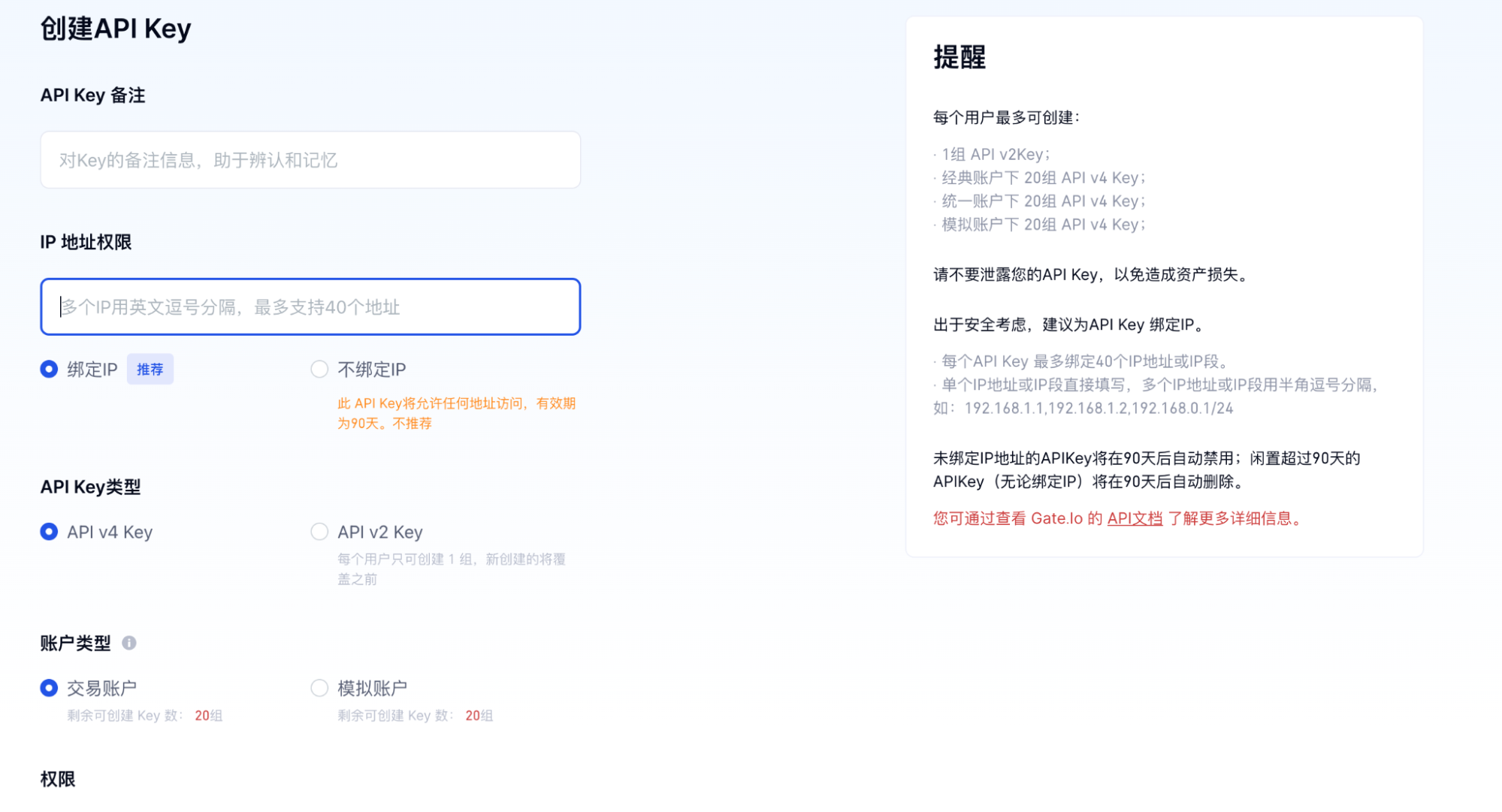 4. 在**创建 API key** 页面上,在 **API key 备注**字段中输入备注。
5. 在 **IP 地址权限**部分,选择**绑定 IP** 并在文本框中输入 Cobo 的 IP 地址 `54.201.57.0`。
6. 在 **API key 类型**部分,选择**API v4 Key**。
7. 在**账户类型**部分,选择**交易账户**。
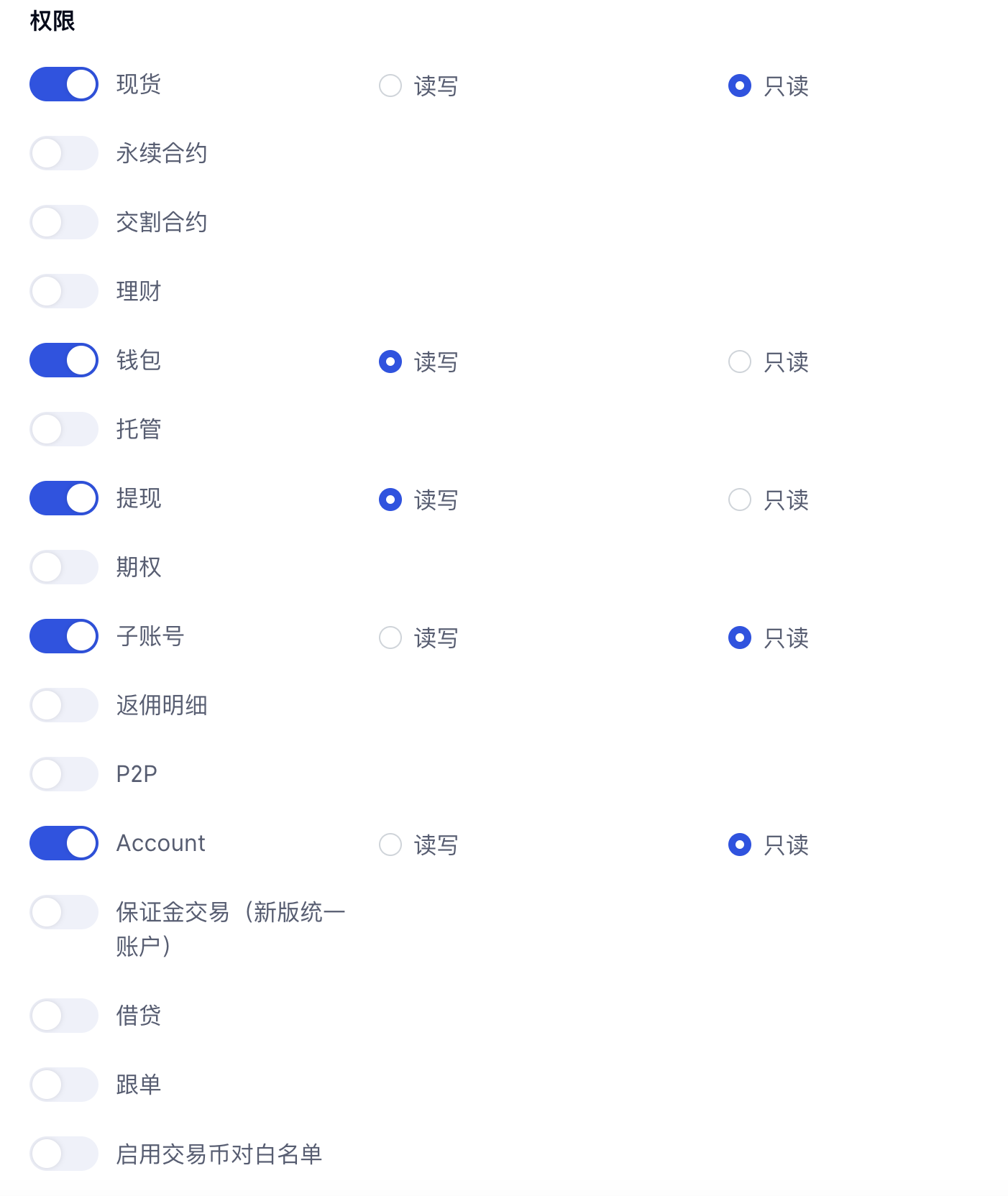
8. 在**权限**部分,启用以下选项:
* **现货**:**只读**
* **钱包**:**读写**
* **提现**:**读写**
* **子账号**:**只读**
* **Account**:**只读**
* **永续期货**:**只读**
* **交割期货**:**只读**
* **期权**:**只读**
4. 在**创建 API key** 页面上,在 **API key 备注**字段中输入备注。
5. 在 **IP 地址权限**部分,选择**绑定 IP** 并在文本框中输入 Cobo 的 IP 地址 `54.201.57.0`。
6. 在 **API key 类型**部分,选择**API v4 Key**。
7. 在**账户类型**部分,选择**交易账户**。
8. 在**权限**部分,启用以下选项:
* **现货**:**只读**
* **钱包**:**读写**
* **提现**:**读写**
* **子账号**:**只读**
* **Account**:**只读**
* **永续期货**:**只读**
* **交割期货**:**只读**
* **期权**:**只读**
 9. 点击**确认**生成 API key。
API key 现已生成,且设置已完成。您可以前往 Cobo Portal,使用 API key 和 API secret key 关联您的 Gate.io 账户。如欲了解如何关联账户,请参见[设置交易所钱包](/cn/portal/exchange-wallets/set-up)。
9. 点击**确认**生成 API key。
API key 现已生成,且设置已完成。您可以前往 Cobo Portal,使用 API key 和 API secret key 关联您的 Gate.io 账户。如欲了解如何关联账户,请参见[设置交易所钱包](/cn/portal/exchange-wallets/set-up)。