> ## Documentation Index
> Fetch the complete documentation index at: https://manuals.cobo.com/llms.txt
> Use this file to discover all available pages before exploring further.
# 注册 API Key
> 学习如何注册 API Key,确保安全访问您的 API。
## 前提条件
您已被分配为 Cobo Portal 中的操作员,经理或管理员[用户角色](/cn/portal/risk-controls/roles-and-permissions)。
## 步骤
### 在 Cobo Portal 中注册 API Key
推荐您使用长期 API Key,并根据以下步骤设置 IP 白名单和 Callback Endpoint。
1. 登录 [Cobo Portal](https://portal.cobo.com/login)。
2. 点击左侧导航栏中的**开发者**。
3. 点击 **WaaS 2.0** 标签,然后切换到 **API Keys** 标签页。
4. 点击**注册 API Key** 打开**注册 API Key** 对话框。
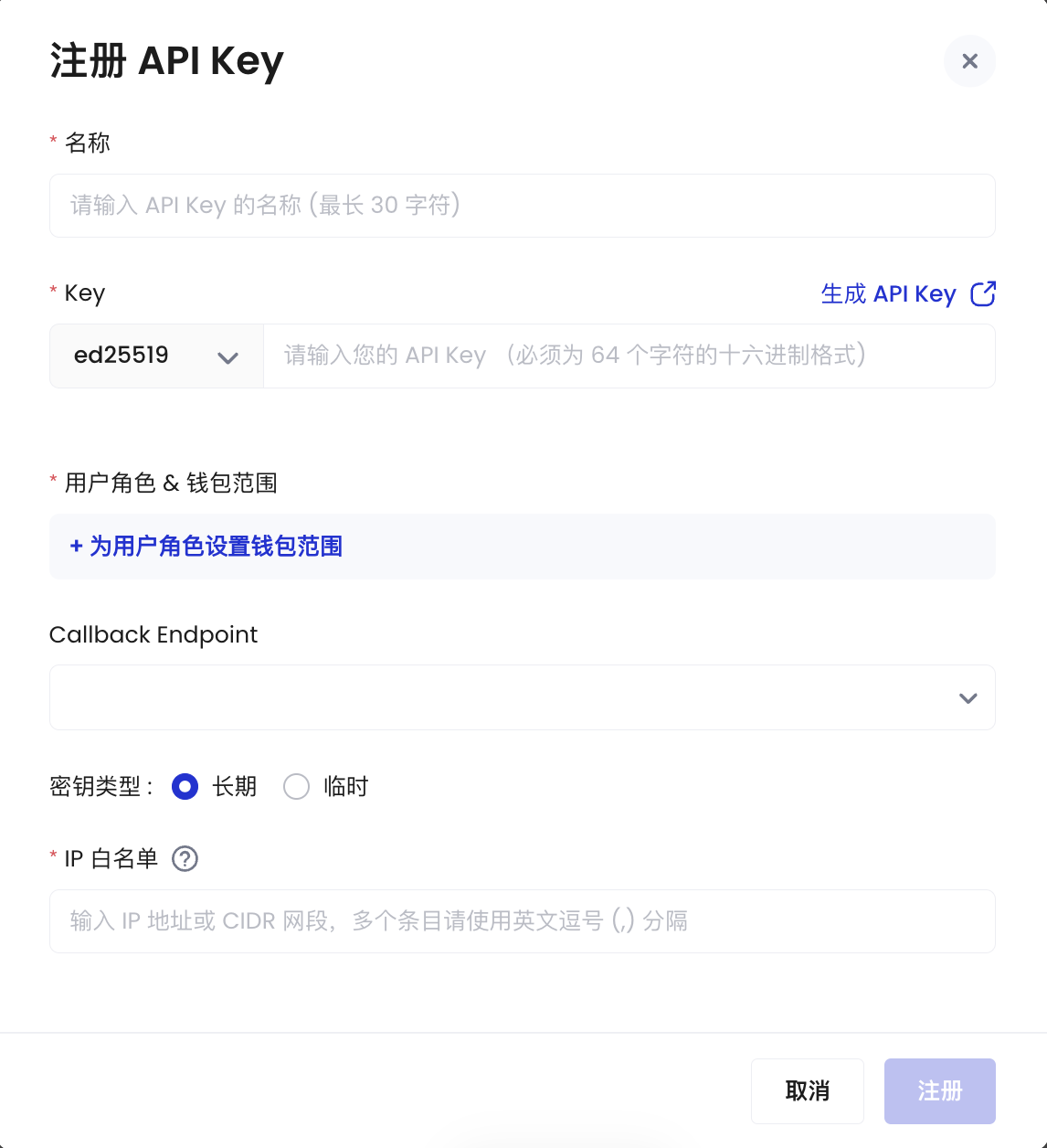 5. 输入 API Key 的名称(最多 30 个字符)。
6. 输入 API Key 和选择加密算法。API Key 是密钥对中的公钥,长度必须为 64 个字符,只能包含数字 0 至 9 和字母 A 至 F。如想了解如何使用 Ed25519 算法生成 API Key,请参阅 [Generate an API key and an API secret](https://www.cobo.com/developers/v2_cn/guides/overview/cobo-auth#generate-an-api-key-and-an-api-secret)。
7. 在**用户角色 & 钱包范围**板块,点击**为用户角色设置钱包范围**来设置该 API key 的用户角色以及可访问的钱包范围。
8. 从对应的下拉列表中选择该 API Key 的用户角色以及可访问的钱包范围。
5. 输入 API Key 的名称(最多 30 个字符)。
6. 输入 API Key 和选择加密算法。API Key 是密钥对中的公钥,长度必须为 64 个字符,只能包含数字 0 至 9 和字母 A 至 F。如想了解如何使用 Ed25519 算法生成 API Key,请参阅 [Generate an API key and an API secret](https://www.cobo.com/developers/v2_cn/guides/overview/cobo-auth#generate-an-api-key-and-an-api-secret)。
7. 在**用户角色 & 钱包范围**板块,点击**为用户角色设置钱包范围**来设置该 API key 的用户角色以及可访问的钱包范围。
8. 从对应的下拉列表中选择该 API Key 的用户角色以及可访问的钱包范围。
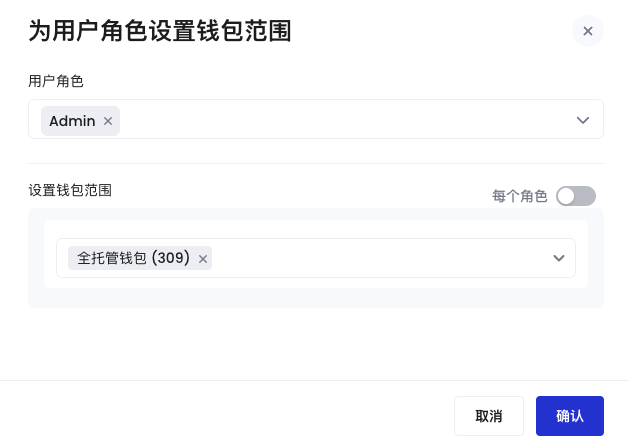 您可以点击**每个角色**来为每个用户角色选择不同的钱包范围。
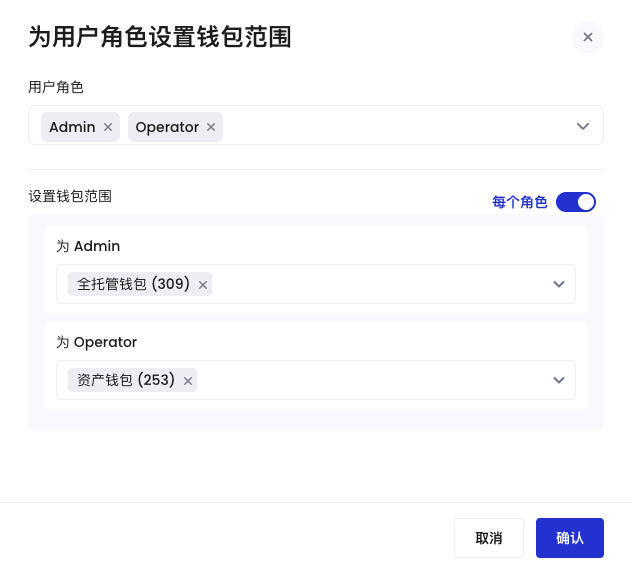 该 API Key 将获得您所勾选的用户角色下的权限并有访问选定钱包的权限。请妥善配置角色,钱包范围尽量不要选择**任何类型钱包**。
点击**确认**来完成配置。
9. 选择此 API Key 使用的 Callback Endpoint,或注册一个新的 Callback Endpoint。所选的 Callback Endpoint 将接收由该 API Key 触发的消息。有关更多信息,请参阅[注册 Callback Endpoint](/cn/portal/developer-console/callbacks-register)。
10. 选择 Key 类型。
* **长期**: 此 Key 类型需要 IP 地址白名单以增强安全性。您必须指定用于发送 API 请求的固定 IP 地址或 CIDR 网段。如需填写多个条目,请使用英文逗号 (,) 分隔。
避免在 [API Playground](https://www.cobo.com/developers/v2/api-references/playground) 中使用长期 Key,因为请求是从 API Playground 发送的,而不是从您指定的 IP 地址发送的。
* **临时**: 临时 Key 在 30 天后过期。如果您还没有准备好静态 IP 地址,可以选择此选项。
11. 按照屏幕上的说明完成注册。
12. 在**安全验证**对话框中,使用多重身份验证(MFA)方式验证您的身份。
该 API Key 将获得您所勾选的用户角色下的权限并有访问选定钱包的权限。请妥善配置角色,钱包范围尽量不要选择**任何类型钱包**。
点击**确认**来完成配置。
9. 选择此 API Key 使用的 Callback Endpoint,或注册一个新的 Callback Endpoint。所选的 Callback Endpoint 将接收由该 API Key 触发的消息。有关更多信息,请参阅[注册 Callback Endpoint](/cn/portal/developer-console/callbacks-register)。
10. 选择 Key 类型。
* **长期**: 此 Key 类型需要 IP 地址白名单以增强安全性。您必须指定用于发送 API 请求的固定 IP 地址或 CIDR 网段。如需填写多个条目,请使用英文逗号 (,) 分隔。
避免在 [API Playground](https://www.cobo.com/developers/v2/api-references/playground) 中使用长期 Key,因为请求是从 API Playground 发送的,而不是从您指定的 IP 地址发送的。
* **临时**: 临时 Key 在 30 天后过期。如果您还没有准备好静态 IP 地址,可以选择此选项。
11. 按照屏幕上的说明完成注册。
12. 在**安全验证**对话框中,使用多重身份验证(MFA)方式验证您的身份。
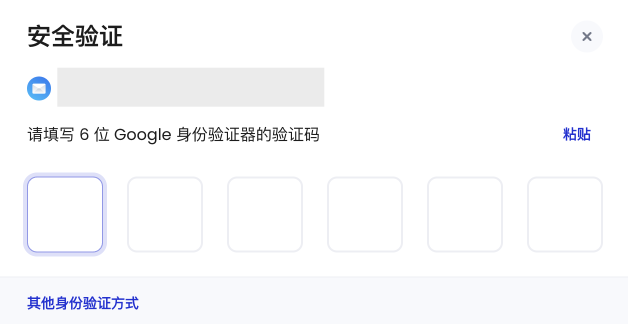 身份验证成功后,您的注册 API Key 请求已提交。
### 在 Portal Mobile 中审批请求
根据您所在团队设置的[业务风控](/cn/portal/organization/governance-intro)规则,该请求可能需要特定数量的团队管理员在 Portal Mobile 上审批。您可以通过点击右上角的个人头像 > **团队管理** > **业务风控** > **开发者**查看注册 API Key 的审批规则。
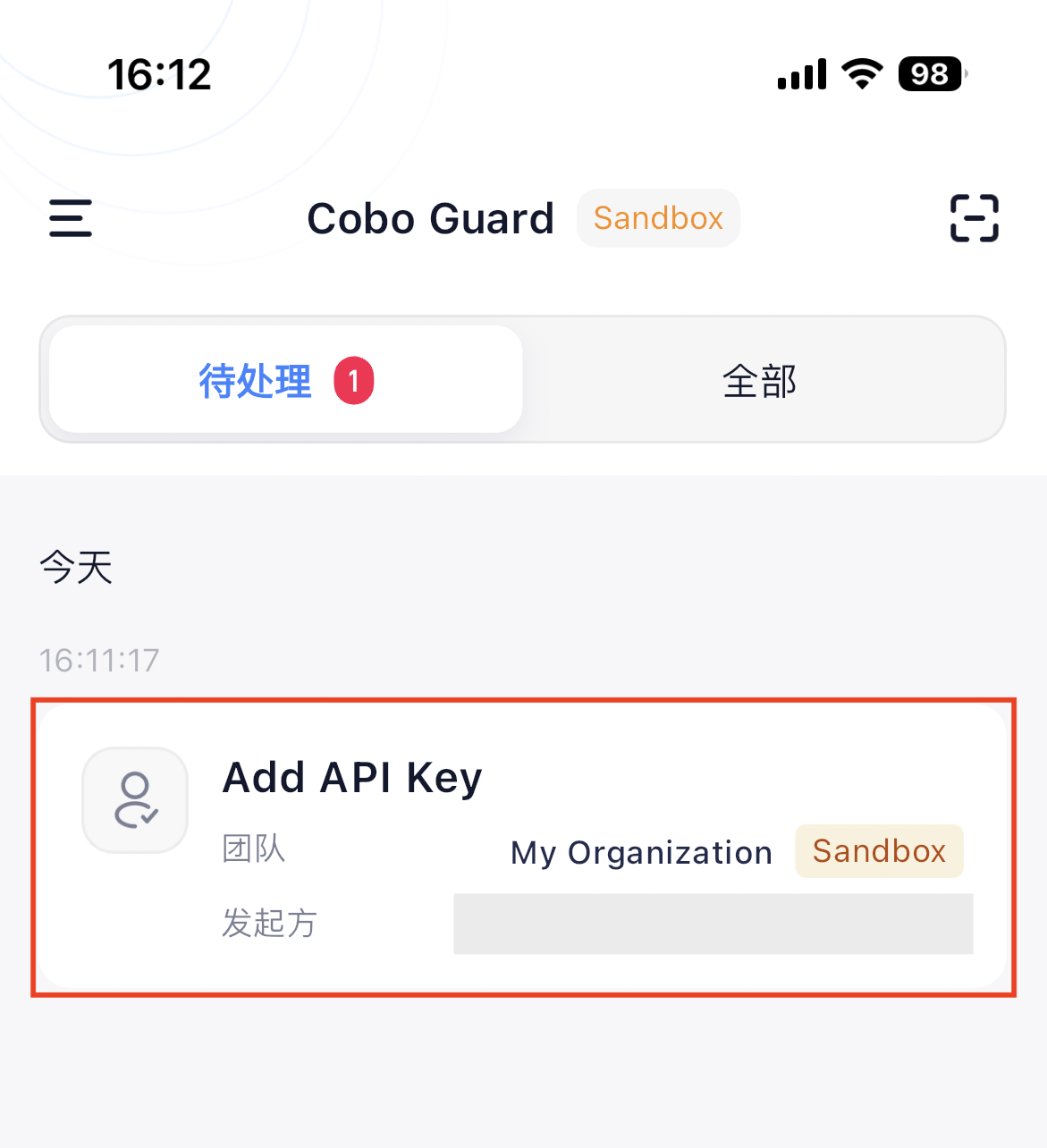
管理员需要打开 Portal Mobile,找到该请求对应的通知,并点击**批准**。
身份验证成功后,您的注册 API Key 请求已提交。
### 在 Portal Mobile 中审批请求
根据您所在团队设置的[业务风控](/cn/portal/organization/governance-intro)规则,该请求可能需要特定数量的团队管理员在 Portal Mobile 上审批。您可以通过点击右上角的个人头像 > **团队管理** > **业务风控** > **开发者**查看注册 API Key 的审批规则。
管理员需要打开 Portal Mobile,找到该请求对应的通知,并点击**批准**。
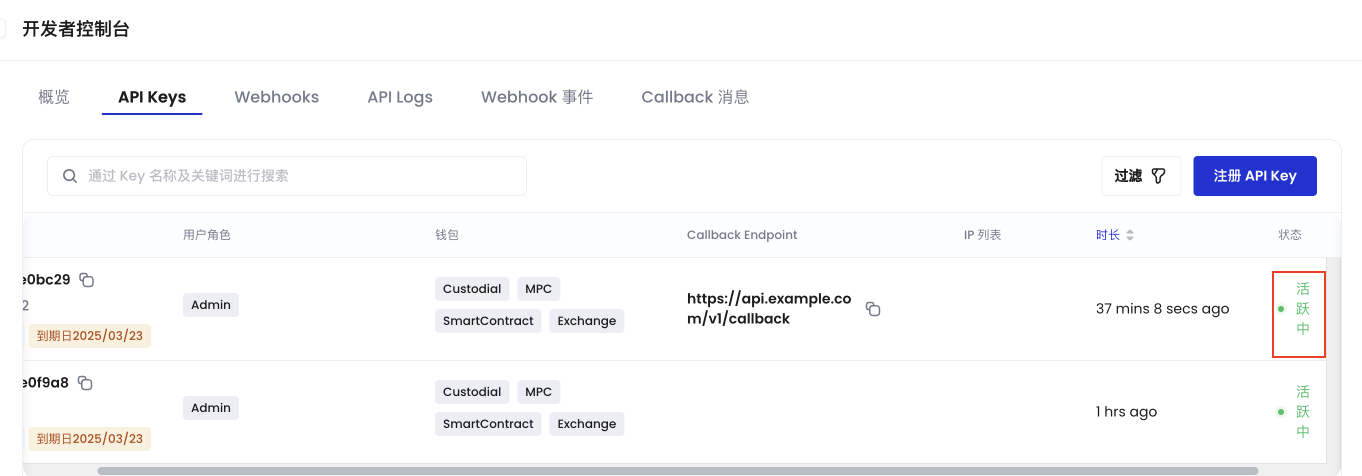
 当审批通过后,API Key 注册成功,您会看到该 API Key 状态变为**活跃中**。
 ## 后续步骤
注册 API Key 后,您可以:
* 编辑 API Key 的名称或相关 Callback Endpoint。
* 让 API Key 失效以禁用与其相关的所有未来 API 访问。
* 根据状态或类型过滤 API Key 列表,以便高效管理 API Key。
API Key 的状态包括:
* 活跃中:API Key 正常工作。
* 已失效:API Key 已被禁用,无法使用该 API Key 访问 WaaS 2.0 服务。
* 新建审批中:API Key 的新建操作正在等待审批。
* 失效审批中:API Key 的失效操作正在等待审批。
* 更新审批中:API Key 的更新操作正在等待审批。
* 使用名称或关键字搜索特定的 API Key。
## 后续步骤
注册 API Key 后,您可以:
* 编辑 API Key 的名称或相关 Callback Endpoint。
* 让 API Key 失效以禁用与其相关的所有未来 API 访问。
* 根据状态或类型过滤 API Key 列表,以便高效管理 API Key。
API Key 的状态包括:
* 活跃中:API Key 正常工作。
* 已失效:API Key 已被禁用,无法使用该 API Key 访问 WaaS 2.0 服务。
* 新建审批中:API Key 的新建操作正在等待审批。
* 失效审批中:API Key 的失效操作正在等待审批。
* 更新审批中:API Key 的更新操作正在等待审批。
* 使用名称或关键字搜索特定的 API Key。