> ## Documentation Index
> Fetch the complete documentation index at: https://manuals.cobo.com/llms.txt
> Use this file to discover all available pages before exploring further.
# 注册 Callback Endpoint
> 掌握如何注册 Callback Endpoint,确保您的 App 能够接收必要的通知。
如果您的服务器防火墙或安全策略基于 IP 做了访问限制,请将以下 IP 地址加入白名单,以确保正常接收 Webhook 和 Callback 通知:
* `54.201.57.0` 用于发送 Callback。
* `52.34.39.169` 用于发送 Webhooks。
## 前提条件
您已按照 [Set up a callback or webhook endpoint](https://www.cobo.com/developers/v2_cn/guides/webhooks-callbacks/set-up-endpoint) 中的说明设置了 Callback Endpoint。
## 步骤
按照以下步骤注册 Callback Endpoint:
1. 登录 [Cobo Portal](https://portal.cobo.com/login)。
2. 点击左侧导航栏中的**开发者**。
3. 点击 **WaaS 2.0** 标签,然后切换到 **API Keys** 标签。
4. 点击**注册 API Key** 按钮或点击某个 API Key 旁边的操作按钮并选择**编辑**。
5. 点击 **Callback Endpoint** 下拉列表,然后点击**注册 Callback Endpoint**。
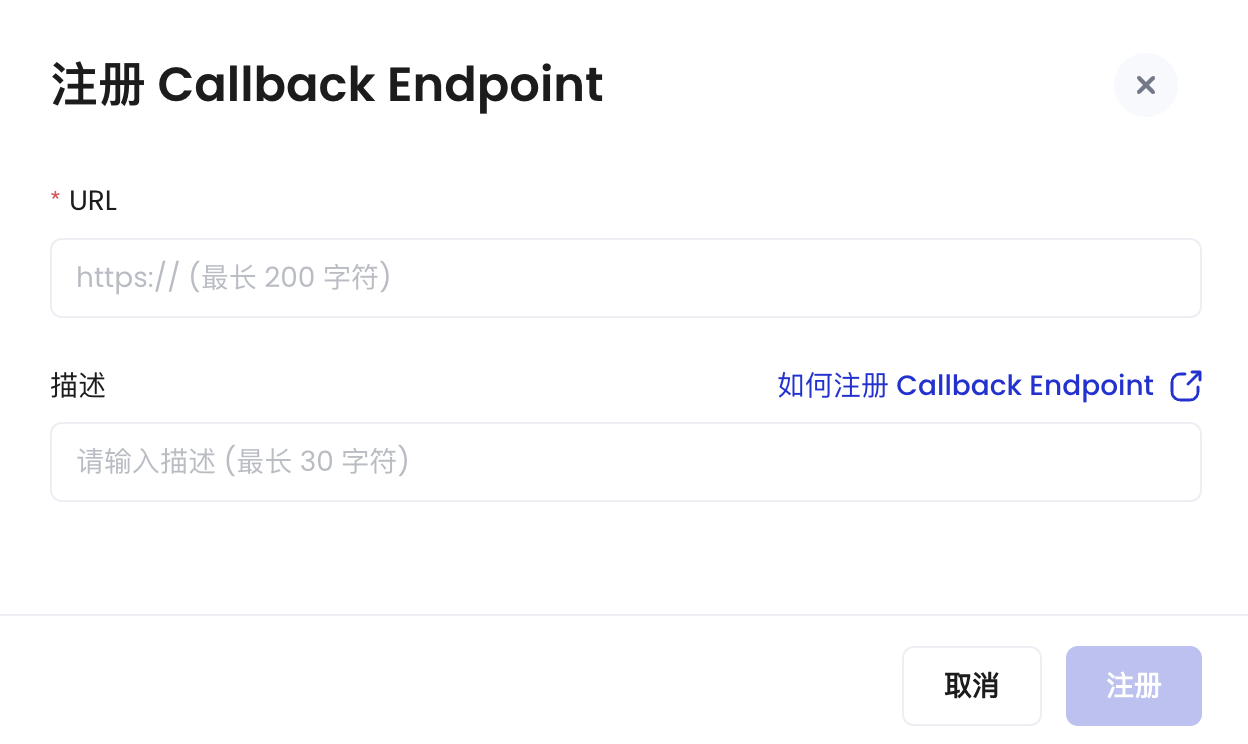 6. 输入 Callback URL。
7. 输入 Callback 描述(最多 30 个字符)。
8. 单击 **注册**。
现在您已完成注册,Callback Endpoint 注册后将无法删除。
## 后续步骤
注册 Callback Endpoint 后,您可以在注册 API Key 时选中该 Endpoint,用于接收由该 API Key 触发的 Callback 消息。有关注册 API Key 的详细说明,请参阅[注册 API Key](/cn/portal/developer-console/create-api-key)。
6. 输入 Callback URL。
7. 输入 Callback 描述(最多 30 个字符)。
8. 单击 **注册**。
现在您已完成注册,Callback Endpoint 注册后将无法删除。
## 后续步骤
注册 Callback Endpoint 后,您可以在注册 API Key 时选中该 Endpoint,用于接收由该 API Key 触发的 Callback 消息。有关注册 API Key 的详细说明,请参阅[注册 API Key](/cn/portal/developer-console/create-api-key)。