> ## Documentation Index
> Fetch the complete documentation index at: https://manuals.cobo.com/llms.txt
> Use this file to discover all available pages before exploring further.

# Cobo Guard 简介

> 探索 Cobo 自研安全 App Cobo Guard，为您的数字资产保驾护航。

## 什么是 Cobo Guard

Cobo Guard 是由 Cobo 开发的先进多功能安全 App，旨在保护您的数字资产。作为所有 [Cobo Portal](/cn/portal/introduction) 用户的免费 App，单个 Cobo Guard 设备可以关联多个 [Cobo Accounts](/cn/accounts/introduction)，提供无缝且安全的资产管理。您可以使用 Cobo Guard 进行身份验证、操作审批，对于 [MPC 钱包](/cn/portal/mpc-wallets/introduction) 用户，还可以进行交易签名和私钥分片管理。

<iframe width="560" height="315" src="https://www.youtube.com/embed/Prt4EMGq49c?si=Q-g8BXSso6CIG-fw" title="YouTube video player" frameborder="0" allow="accelerometer; autoplay; clipboard-write; encrypted-media; gyroscope; picture-in-picture; web-share" referrerpolicy="strict-origin-when-cross-origin" allowfullscreen />

## Cobo Guard 的设计初衷

### 用于保护资产安全的非对称（密钥）加密

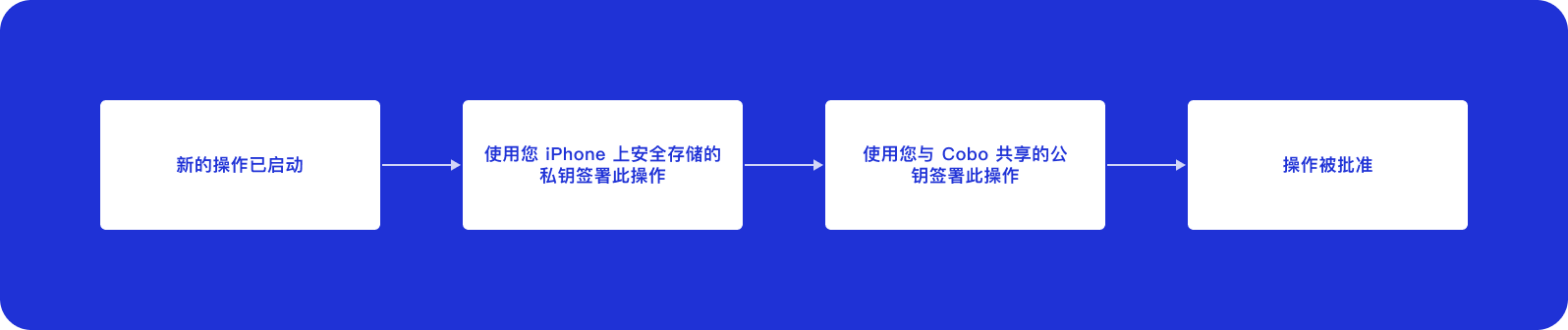
Cobo Guard 采用非对称加密来保护您的资产安全。您的公钥与 Cobo 共享，而私钥则安全存储在您 iPhone 的原生 Secure Enclave 中。这种设置确保所有操作审批均通过您的私钥进行签名，并使用您与 Cobo 共享的公钥进行身份验证。

<img src="https://mintcdn.com/cobo-6/0NNnBAPdaSon0xtQ/cn/images/cobo-guard/common/guard1.png?fit=max&auto=format&n=0NNnBAPdaSon0xtQ&q=85&s=8cc1a490482383aa1511c7602a81228a" className="diagram" width="1596" height="336" data-path="cn/images/cobo-guard/common/guard1.png" />

<Note>我们非常重视安全性。为了保持严格的安全标准，Cobo Guard 目前仅在 iOS 设备上提供，因为这些设备能够提供机构级数字资产保护所需的安全级别。</Note>

## 主要功能

### 多重身份验证 (MFA) 方式

多重身份验证 (MFA) 是 Cobo Portal 中的一项重要安全措施。在登录时，除密码外，您还需通过 MFA 进行额外身份验证，为账户增加一层保护，防止密码泄露后的未经授权访问。

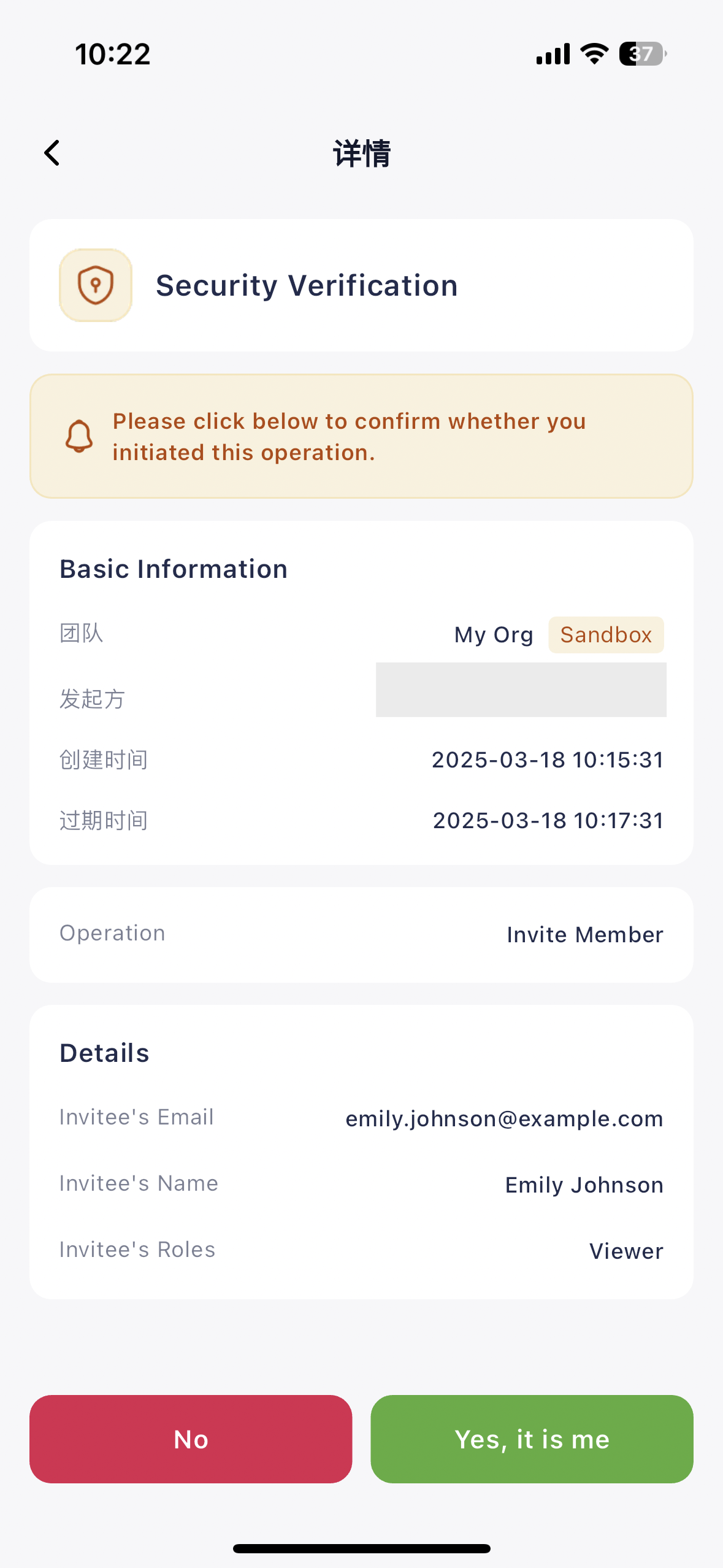
Cobo Guard 作为一种 MFA 方式，可用于快速验证登录或关键操作（如邀请新用户、修改风险控制）。只需在 Cobo Guard 上点击确认，即可验证用户身份，确保账户安全无虞。

以下截图展示了如何使用 Cobo Guard 验证是您本人发起的操作：

<img src="https://mintcdn.com/cobo-6/tbPu8rRRgnK8S9g7/cn/images/cobo-guard/mfa.png?fit=max&auto=format&n=tbPu8rRRgnK8S9g7&q=85&s=8a62003905159b2ba557669e117e4580" className="screenshot_modal" alt="Multi-factor authentication (MFA)" width="1179" height="2556" data-path="cn/images/cobo-guard/mfa.png" />

### MPC 私钥分片管理器

安全生成、备份和管理 MPC 私钥分片，有效提升资产保护，降低单点故障风险。Cobo Guard 通过将密钥分片分散至多个参与方或设备，确保任何单一实体都无法完全控制私钥，从而大幅提升安全性。

如需了解如何使用 Cobo Guard 生成和备份私钥分片，请参阅[生成并备份私钥分片](/cn/guard/generate-and-back-up-key-shares)。

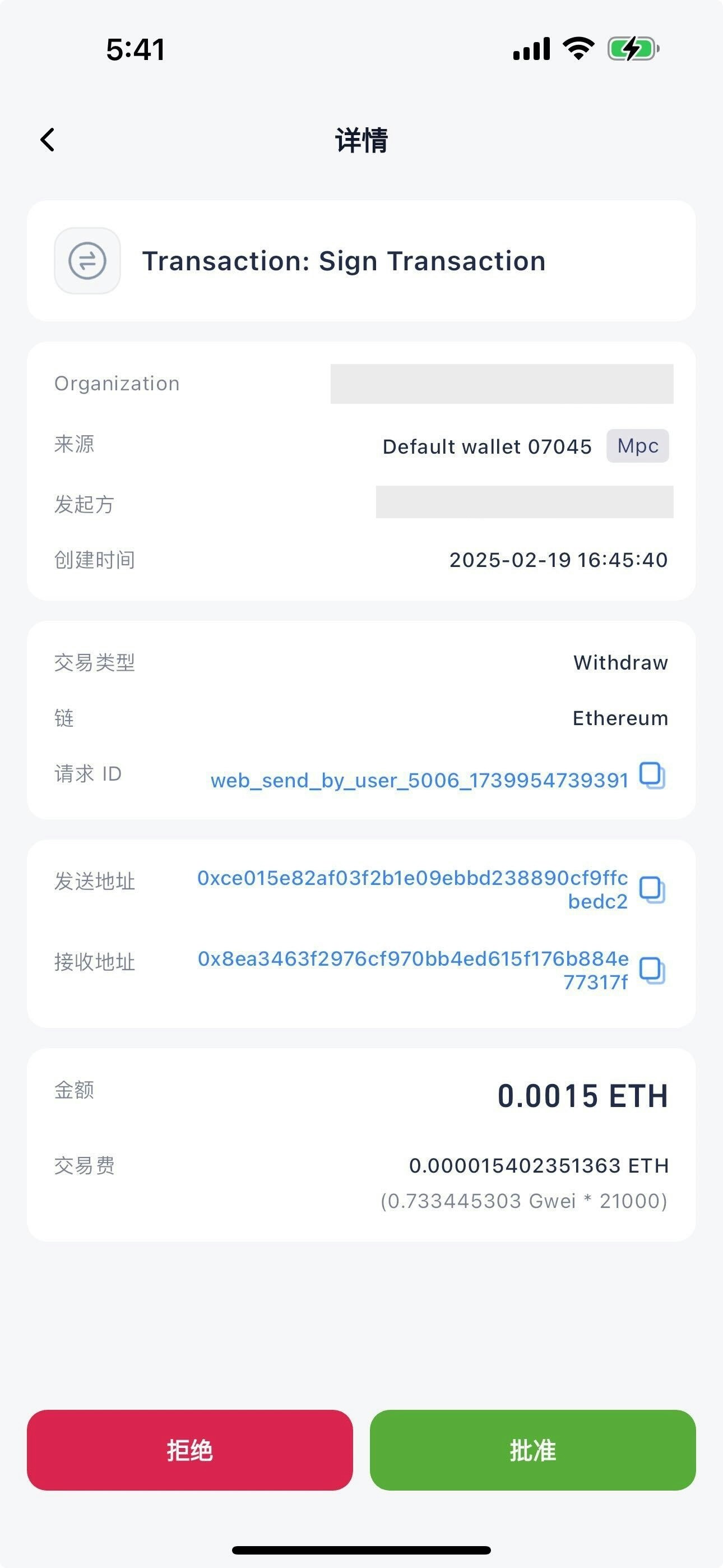
以下截图展示了如何使用 Cobo Guard 对交易进行签名：

<img src="https://mintcdn.com/cobo-6/tbPu8rRRgnK8S9g7/cn/images/cobo-guard/sign-tx.jpg?fit=max&auto=format&n=tbPu8rRRgnK8S9g7&q=85&s=06653aa0a8dd8506950f3e0963d468a7" className="screenshot_modal" alt="Key share manager" width="1290" height="2796" data-path="cn/images/cobo-guard/sign-tx.jpg" />

### 操作审批方式

Cobo Guard 支持对团队内其他用户发起的操作进行审批，包括交易、团队管理和风险控制调整，确保敏感操作受到严格验证后执行。

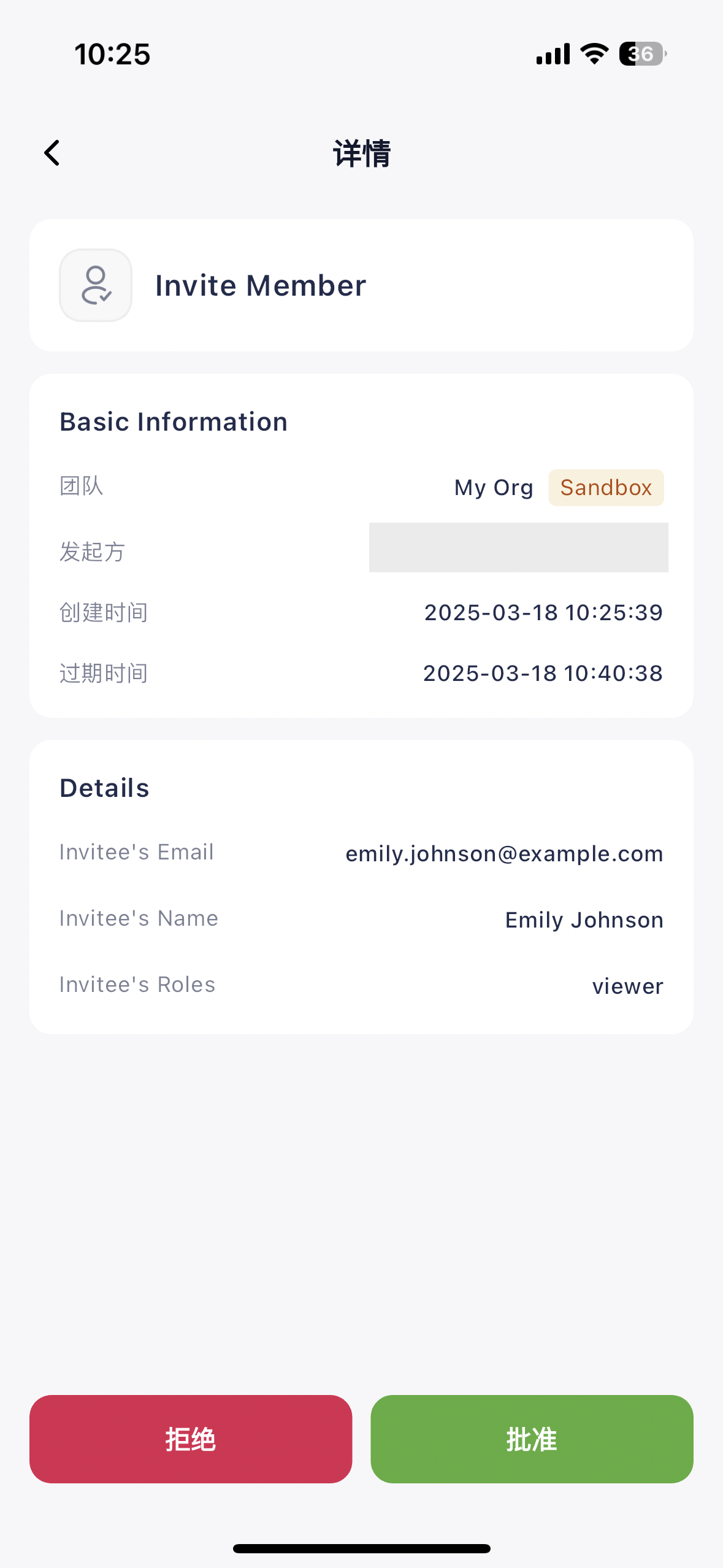
根据风险控制策略，某些操作需经指定成员批准。Cobo Guard 将及时通知审批人，审批人可直接在 App 中查看和授权请求，保障操作安全可靠。

以下截图展示了如何使用 Cobo Guard 审批其他成员发起的操作：

<img src="https://mintcdn.com/cobo-6/0NNnBAPdaSon0xtQ/cn/images/cobo-guard/approve.png?fit=max&auto=format&n=0NNnBAPdaSon0xtQ&q=85&s=78dfc4e33016cede63970df9a2d32f63" className="screenshot_modal" alt="Operation approval" width="1179" height="2556" data-path="cn/images/cobo-guard/approve.png" />

以下表格列出了需要通过团队内其他成员通过 Cobo Guard 审批的操作：

<table>
  <thead>
    <tr>
      <th>模块</th>
      <th>操作</th>
    </tr>
  </thead>

  <tbody>
    <tr>
      <td rowspan="3">[团队管理](/cn/portal/organization/introduction)</td>
      <td>冻结团队</td>
    </tr>

    <tr>
      <td>修改团队名称</td>
    </tr>

    <tr>
      <td>修改团队 Logo</td>
    </tr>

    <tr>
      <td rowspan="5">[成员管理](/cn/portal/organization/manage-members)</td>
      <td>邀请成员</td>
    </tr>

    <tr>
      <td>删除成员</td>
    </tr>

    <tr>
      <td>冻结成员</td>
    </tr>

    <tr>
      <td>解冻成员</td>
    </tr>

    <tr>
      <td>修改成员用户角色</td>
    </tr>

    <tr>
      <td>[业务风控](/cn/portal/organization/governance-intro)</td>
      <td>修改业务风控</td>
    </tr>

    <tr>
      <td>[转账](/cn/portal/transfers/introduction)</td>
      <td>提币</td>
    </tr>

    <tr>
      <td rowspan="3">钱包管理</td>
      <td>[管理地址簿](/cn/portal/address-book/manage)</td>
    </tr>

    <tr>
      <td>[管理链下交易风控](/cn/portal/risk-controls/off-chain-tx-set-transfer)</td>
    </tr>

    <tr>
      <td>[管理地址列表](/cn/portal/risk-controls/address-list)</td>
    </tr>

    <tr>
      <td rowspan="2">[开发者中心](/cn/portal/developer-console/introduction)</td>
      <td>管理 API Keys</td>
    </tr>

    <tr>
      <td>管理 Webhook Endpoints</td>
    </tr>

    <tr>
      <td rowspan="9">[MPC 钱包（机构钱包）](/cn/portal/mpc-wallets/ocw/introduction)</td>
      <td>生成签名私钥</td>
    </tr>

    <tr>
      <td>删除活跃的签名私钥</td>
    </tr>

    <tr>
      <td>生成恢复私钥</td>
    </tr>

    <tr>
      <td>删除活跃的恢复私钥</td>
    </tr>

    <tr>
      <td>将签名私钥升级为主控私钥</td>
    </tr>

    <tr>
      <td>重新生成主控私钥</td>
    </tr>

    <tr>
      <td>删除活跃的私钥（高级 MPC Vaults 操作）</td>
    </tr>

    <tr>
      <td>重新生成私钥（高级 MPC Vaults 操作）</td>
    </tr>

    <tr>
      <td>更新签名人角色和私钥用途（高级 MPC Vaults 操作）</td>
    </tr>

    <tr>
      <td>[MPC 钱包（终端用户钱包）](/cn/portal/mpc-wallets/ucw/introduction)</td>
      <td>创建项目</td>
    </tr>

    <tr>
      <td rowspan="3">[智能合约钱包](/cn/portal/smart-contract-wallets/introduction)</td>
      <td>修改钱包名称或标签</td>
    </tr>

    <tr>
      <td>创建智能合约钱包</td>
    </tr>

    <tr>
      <td>创建链上交易风控</td>
    </tr>

    <tr>
      <td>[交易所钱包](/cn/portal/exchange-wallets/introduction)</td>
      <td>主账户与子账户间内部划转</td>
    </tr>
  </tbody>
</table>