> ## Documentation Index
> Fetch the complete documentation index at: https://manuals.cobo.com/llms.txt
> Use this file to discover all available pages before exploring further.
# 查看质押仓位和活动
> 查看 Staking App 中的质押仓位和活动,获取已质押金额和奖励概览。
Staking App 支持使用[机构 Vault](/cn/portal/mpc-wallets/ocw/create-mpc-vault) 中的 [MPC 钱包](/cn/portal/mpc-wallets/introduction)进行 BTC 质押([Babylon](https://babylonlabs.io/))和 ETH 质押([Beacon Chain](https://ethereum.org/en/roadmap/beacon-chain/))。
前提条件:所有用户角色都可以查看质押仓位和活动。要进行质押、解除质押或提币,您需要具备[质押员](/cn/portal/organization/roles-and-permissions)角色。
选择 **BTC** 或 **ETH** 选项卡以查看每种质押的具体说明。
1. 点击左侧导航栏中的 **Apps**,找到 **Staking**,然后点击**打开**,打开 Staking。
2. 找到 Babylon,在同一行中点击**操作**下的**查看**按钮。
3. 在质押详情页面会显示质押情况概览,然后是**质押仓位**(Staking Positions)和**活动**(Activity)部分。
## 质押仓位
在**质押仓位**(Staking Positions)部分,您可以按行查看质押仓位的详细信息,包括质押金额、到期日、可赎回金额和仓位状态等。
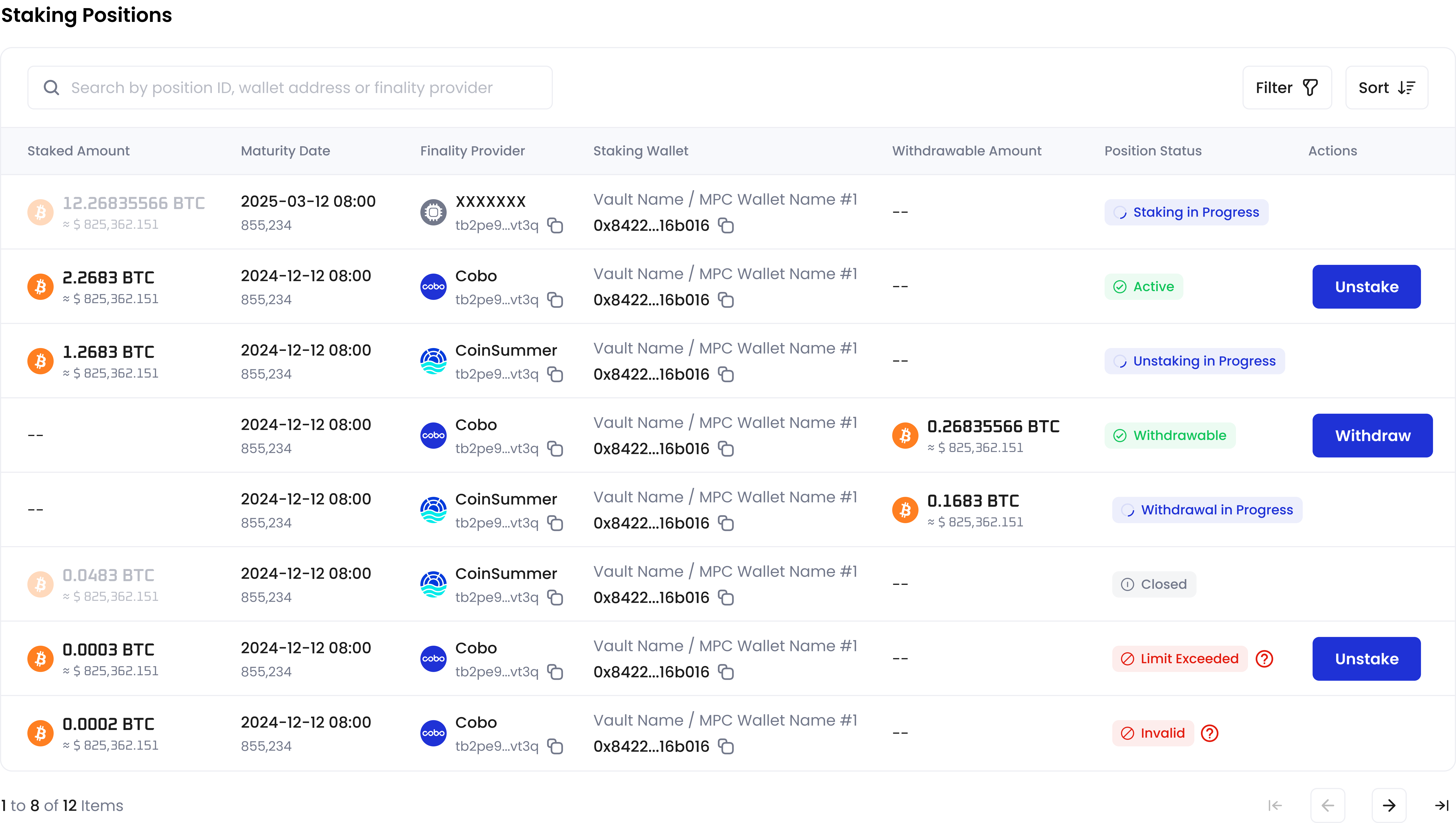 **仓位状态**(Position Status)取决于您的质押操作结果。有关详细解释,请参阅[质押](/cn/apps/staking/stake)、[解除质押](/cn/apps/staking/unstake)和[赎回](/cn/apps/staking/withdraw)文档。
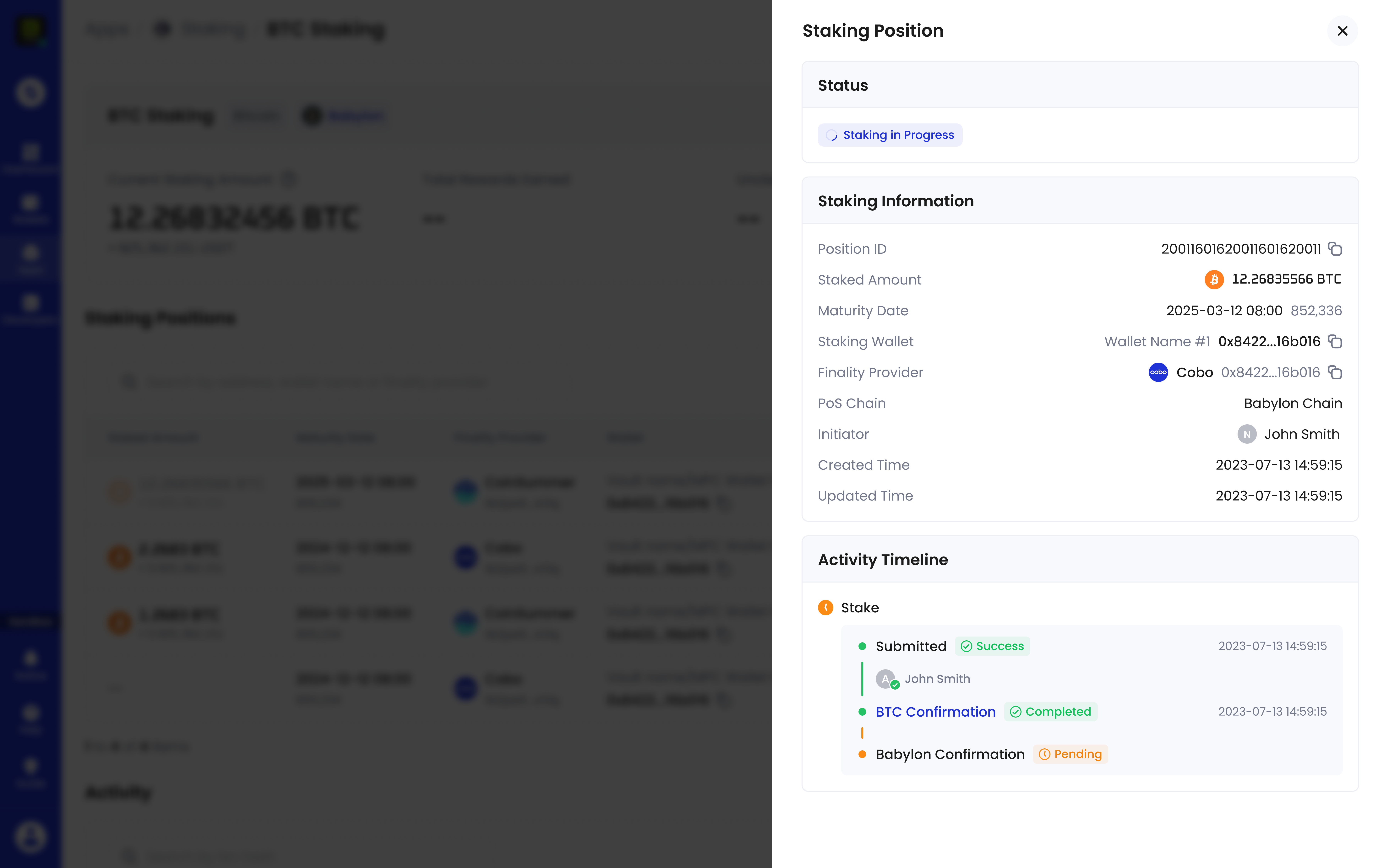
您可以点击质押仓位所在的行查看更多详细信息,包括**仓位 ID**和**活动时间轴**。在**活动时间轴**部分,点击蓝色超链接文本(例如,**BTC Confirmation**),可以查看该步骤的详细状态。
**仓位状态**(Position Status)取决于您的质押操作结果。有关详细解释,请参阅[质押](/cn/apps/staking/stake)、[解除质押](/cn/apps/staking/unstake)和[赎回](/cn/apps/staking/withdraw)文档。
您可以点击质押仓位所在的行查看更多详细信息,包括**仓位 ID**和**活动时间轴**。在**活动时间轴**部分,点击蓝色超链接文本(例如,**BTC Confirmation**),可以查看该步骤的详细状态。
 ## 活动
在**活动**(Activity)部分,您可以查看您的质押操作历史及其状态。
## 活动
在**活动**(Activity)部分,您可以查看您的质押操作历史及其状态。
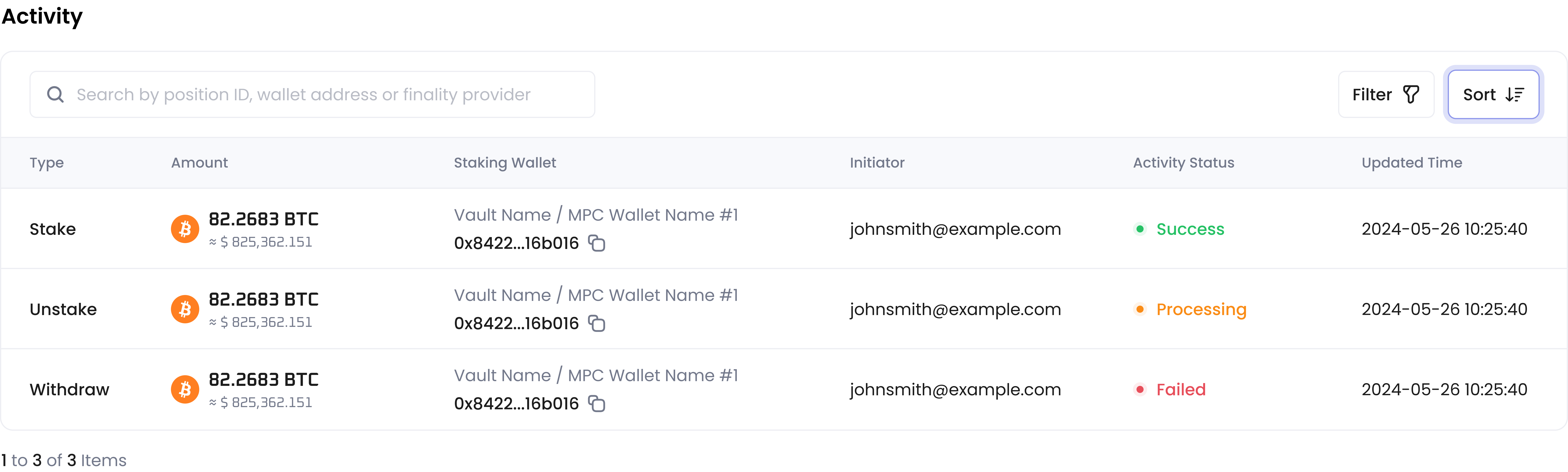 **活动状态**(Activity Status)取决于您的质押操作结果。通过 Babylon 进行 BTC 质押时,在 Babylon 确认交易之前,**活动状态**(Activity Status)将保持为**处理中**(Processing)。如果风险控制政策或签名人拒绝了交易,状态将显示为**失败**(Failed)。如果通过,根据 Babylon 是否确认交易,最终状态将显示为**成功**(Success)或**失败**(Failed)。
赎回无需 Babylon 确认;交易转入链上,状态即显示为**成功**(Success)。
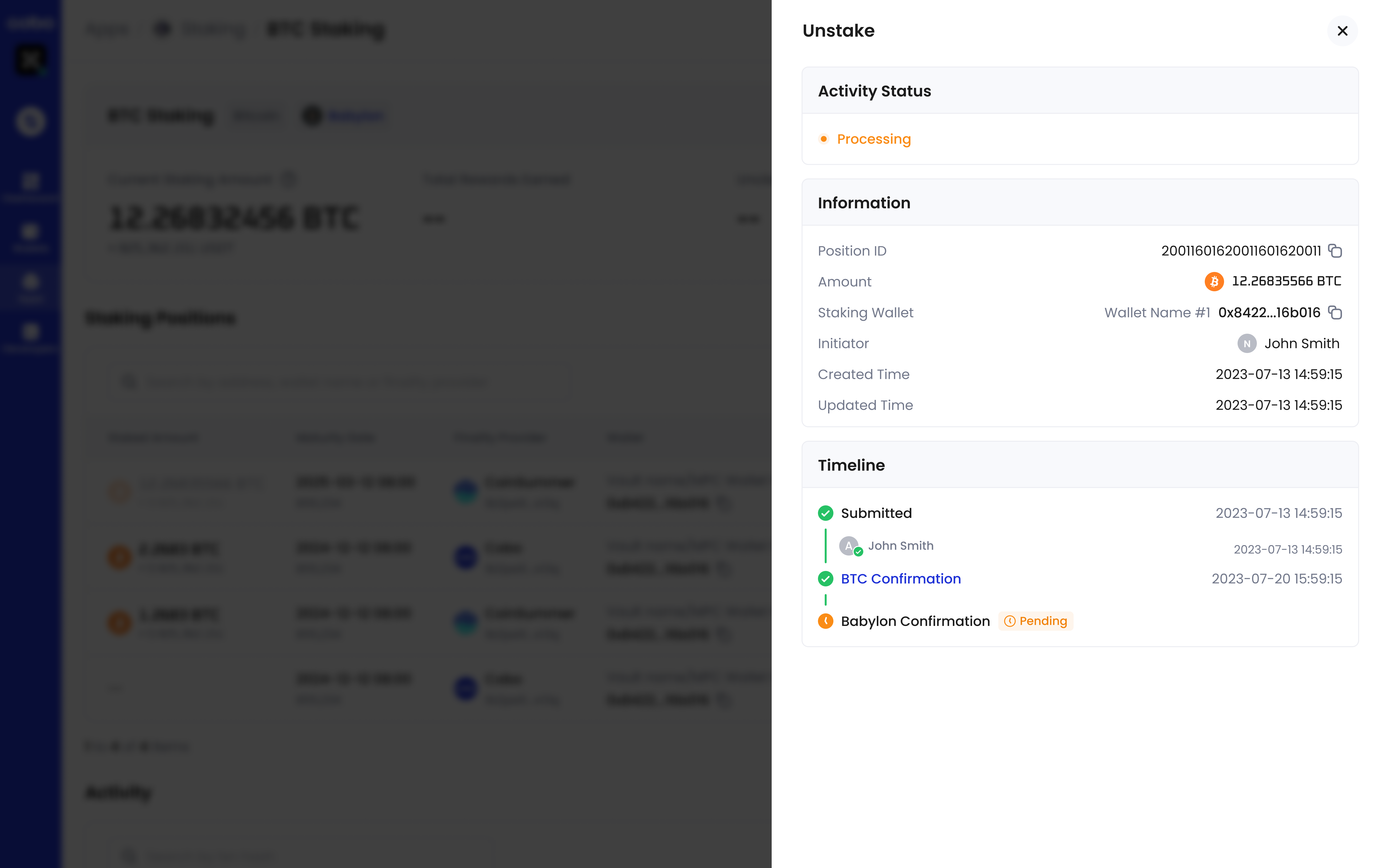
您可以点击活动所在的行查看更多详细信息,包括**仓位 ID**(Position ID)和**时间轴**(Timeline)。在**时间轴**(Timeline)部分,点击蓝色超链接文本(例如**BTC Confirmation**),可以查看该步骤的详细状态。
**活动状态**(Activity Status)取决于您的质押操作结果。通过 Babylon 进行 BTC 质押时,在 Babylon 确认交易之前,**活动状态**(Activity Status)将保持为**处理中**(Processing)。如果风险控制政策或签名人拒绝了交易,状态将显示为**失败**(Failed)。如果通过,根据 Babylon 是否确认交易,最终状态将显示为**成功**(Success)或**失败**(Failed)。
赎回无需 Babylon 确认;交易转入链上,状态即显示为**成功**(Success)。
您可以点击活动所在的行查看更多详细信息,包括**仓位 ID**(Position ID)和**时间轴**(Timeline)。在**时间轴**(Timeline)部分,点击蓝色超链接文本(例如**BTC Confirmation**),可以查看该步骤的详细状态。
 1. 点击左侧导航栏中的 **Apps**,找到 **Staking**,然后点击**打开**,打开 Staking。
2. 找到 Beacon Chain,在同一行中点击**操作**下的**查看** (View) 按钮。
3. 在质押详情页面会显示已质押金额和奖励概览,然后是**质押仓位** (Staking Positions) 和**活动** (Activity) 部分。
## 质押仓位
在**质押仓位** (Staking Positions) 部分,您可以在各行查看质押仓位的详细信息,包括质押金额、奖励和状态。
1. 点击左侧导航栏中的 **Apps**,找到 **Staking**,然后点击**打开**,打开 Staking。
2. 找到 Beacon Chain,在同一行中点击**操作**下的**查看** (View) 按钮。
3. 在质押详情页面会显示已质押金额和奖励概览,然后是**质押仓位** (Staking Positions) 和**活动** (Activity) 部分。
## 质押仓位
在**质押仓位** (Staking Positions) 部分,您可以在各行查看质押仓位的详细信息,包括质押金额、奖励和状态。
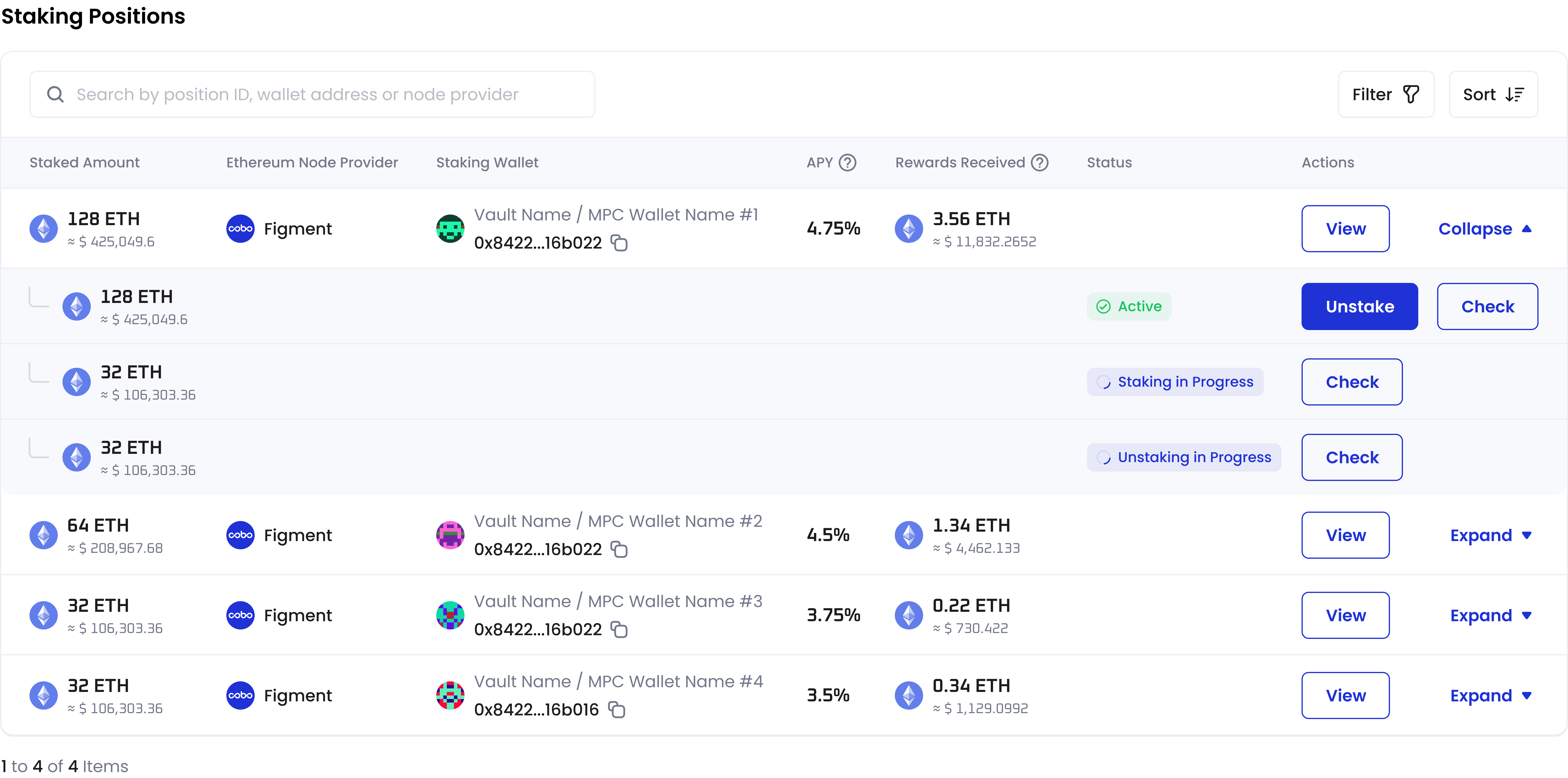 * **质押金额** (Staked Amount) 仅包括处于**活跃** (Active) 状态的 ETH。
* 点击**扩展** (Expand) 查看该仓位下的 ETH 详细状态。**状态** (Status) 取决于您的质押操作结果。有关详细说明,请参阅[质押](/cn/apps/staking/stake)和[解除质押](/cn/apps/staking/unstake)文档(选择 **ETH** 选项卡)。
* 点击 ETH 所在行的**查看** (Check) 按钮,查看相应的验证者及其状态。
* 点击质押仓位所在行的**查看** (View) 按钮以查看更多详细信息,包括**仓位 ID** (Position Id)、**验证者公钥** (Validator Public Key) 和**活动时间轴** (Activity Timeline)。
* **质押金额** (Staked Amount) 仅包括处于**活跃** (Active) 状态的 ETH。
* 点击**扩展** (Expand) 查看该仓位下的 ETH 详细状态。**状态** (Status) 取决于您的质押操作结果。有关详细说明,请参阅[质押](/cn/apps/staking/stake)和[解除质押](/cn/apps/staking/unstake)文档(选择 **ETH** 选项卡)。
* 点击 ETH 所在行的**查看** (Check) 按钮,查看相应的验证者及其状态。
* 点击质押仓位所在行的**查看** (View) 按钮以查看更多详细信息,包括**仓位 ID** (Position Id)、**验证者公钥** (Validator Public Key) 和**活动时间轴** (Activity Timeline)。
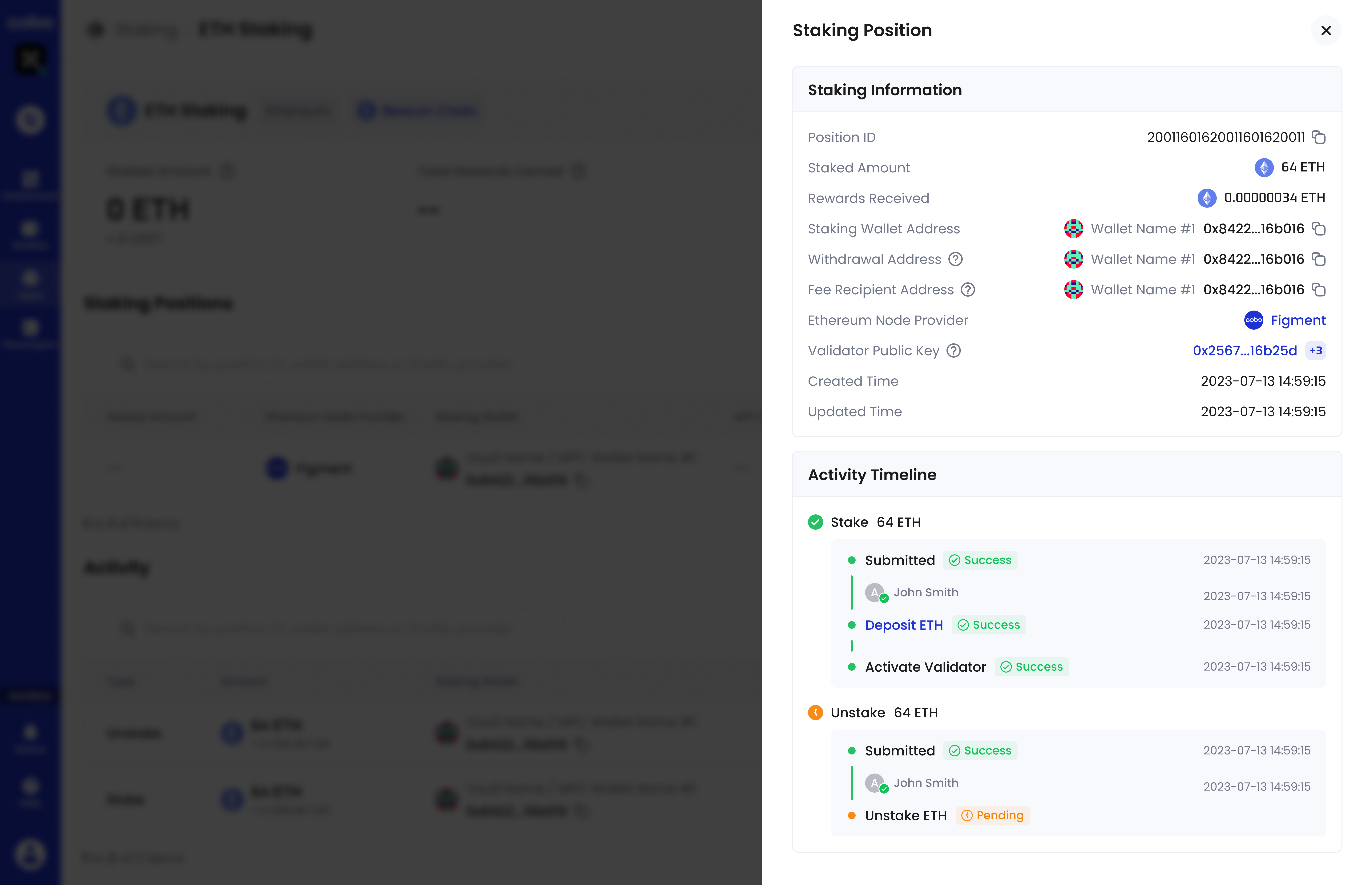 * 在**活动时间轴** (Activity Timeline) 部分,点击蓝色超链接文本(例如,Deposit ETH),可以查看该步骤的详细状态。
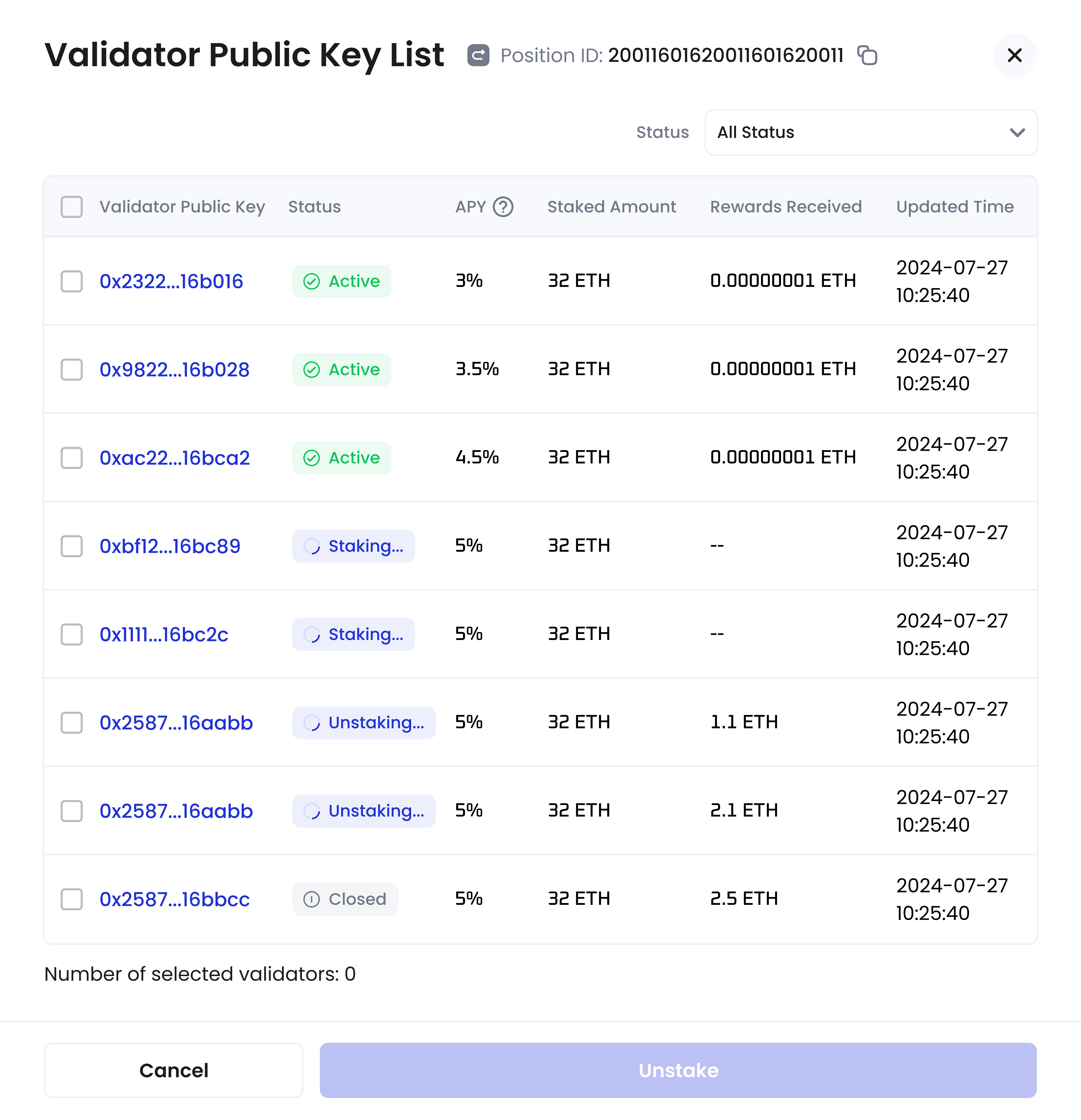
* 在**质押信息** (Staking Information) 部分,您可以点击**验证者公钥** (Validator Public Key) 字段中的数字,查看质押仓位验证者的完整列表。
* 在**活动时间轴** (Activity Timeline) 部分,点击蓝色超链接文本(例如,Deposit ETH),可以查看该步骤的详细状态。
* 在**质押信息** (Staking Information) 部分,您可以点击**验证者公钥** (Validator Public Key) 字段中的数字,查看质押仓位验证者的完整列表。
 ## 活动
在**活动** (Activity) 部分,您可以查看您的质押操作历史及其状态。
## 活动
在**活动** (Activity) 部分,您可以查看您的质押操作历史及其状态。
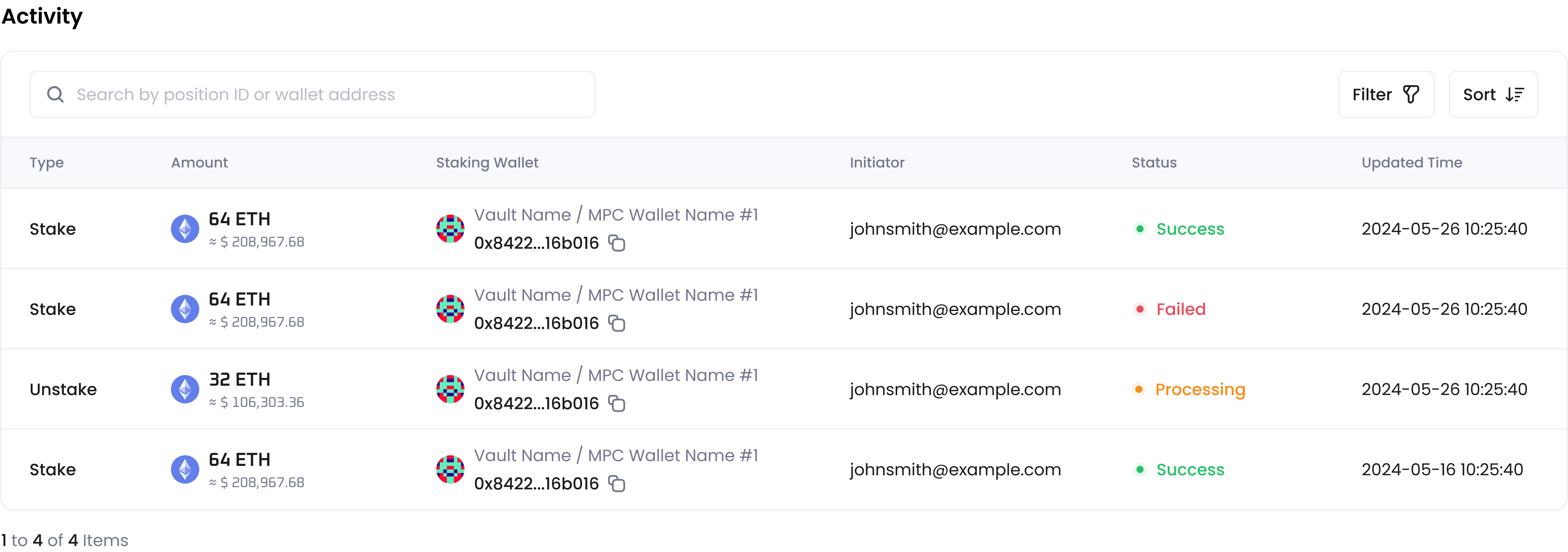 **状态** (Status) 取决于您的质押操作结果。有关详细说明,请参阅[质押](/en/apps/staking/stake)和[解除质押](/en/apps/staking/unstake)文档(先前往 **ETH** 选项卡)。
您可以点击活动所在的行查看更多详细信息,包括**仓位 ID** (Position ID)、**验证者公钥** (Validator Public Key) 和**时间轴** (Timeline) 。在**时间轴** (Timeline) 部分,点击蓝色超链接文本(例如,**Deposit ETH**),可以查看该步骤的详细状态。
**状态** (Status) 取决于您的质押操作结果。有关详细说明,请参阅[质押](/en/apps/staking/stake)和[解除质押](/en/apps/staking/unstake)文档(先前往 **ETH** 选项卡)。
您可以点击活动所在的行查看更多详细信息,包括**仓位 ID** (Position ID)、**验证者公钥** (Validator Public Key) 和**时间轴** (Timeline) 。在**时间轴** (Timeline) 部分,点击蓝色超链接文本(例如,**Deposit ETH**),可以查看该步骤的详细状态。