> ## Documentation Index
> Fetch the complete documentation index at: https://manuals.cobo.com/llms.txt
> Use this file to discover all available pages before exploring further.
# 看板
> 掌握 Staking App 的管理方法,查看不同资产和协议的质押状态,获取实时更新的信息。
要管理 Staking,请点击左侧导航栏中的 **Apps**,找到 **Staking**,然后点击**打开**,打开 Staking。
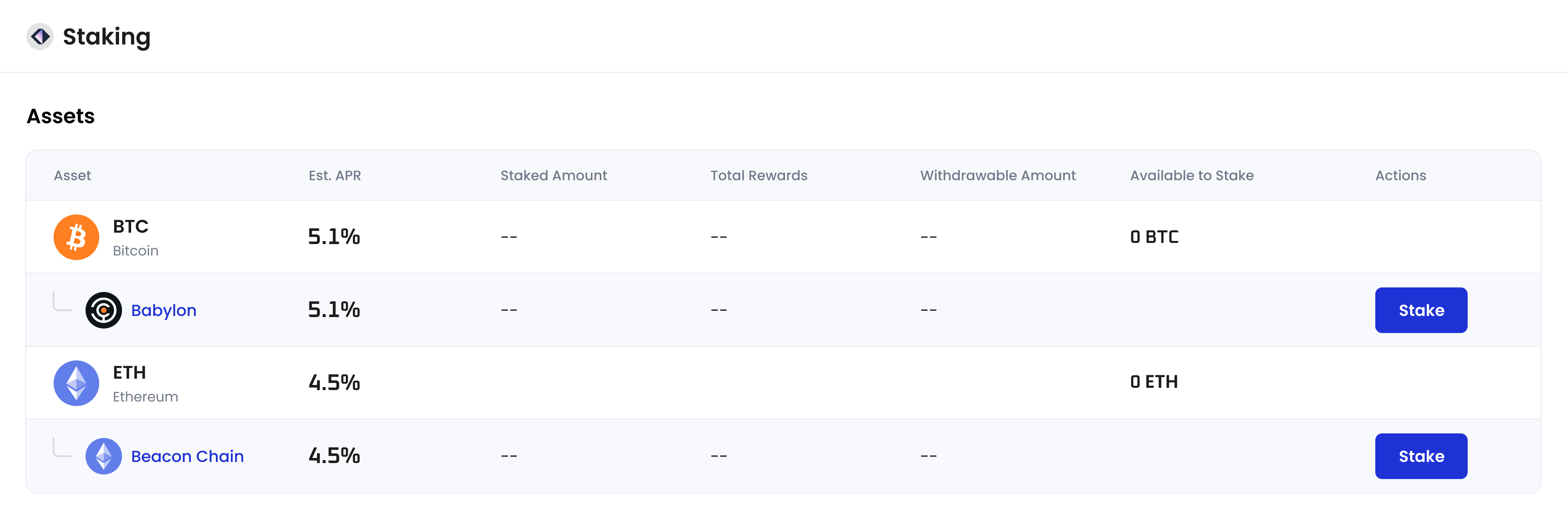 在**Staking**页面,**资产**(Assets)表格列出了不同资产和协议的质押状态。您可以在此找到以下信息:
* **资产**(Asset) - 显示支持的代币以及每种代币类型对应的质押协议,例如 BTC 及其质押协议 Babylon。点击协议图标或名称可以了解有关协议的更多信息。
* **预计年化收益率**(Est. APR) - 预计年化收益率 (APR)。如果没有年利率数据,则显示为"--"。
* **质押金额**(Staked Amount)- 当前锁定的资产金额,包括处于**已启动**(Active)状态和**解除质押中**(Unstaking in Progress)状态的资产。余额为零将显示为 "0",未持有将显示为"--"。
* **奖励总额**(Total Rewards) - 已发放但尚未领取的奖励。
* **可赎回金额**(Withdrawable Amount) - 可提取到钱包的资产金额。
* **可质押**(Available to Stake) - 该项表示您授权的**钱包范围**中可进行质押的资产金额(在安装 App 的过程中会要求设置**钱包范围**,您也可以在 [App 设置](/cn/apps/app-settings)中更改**钱包范围**)。
* **操作**(Actions)
* 点击**质押**(Stake)按钮,按照协议启动质押。
* 点击**查看**(View)按钮,查看协议的详细质押信息。
您在相应协议下已进行资产质押后,**查看**(View)按钮才会出现。
在**Staking**页面,**资产**(Assets)表格列出了不同资产和协议的质押状态。您可以在此找到以下信息:
* **资产**(Asset) - 显示支持的代币以及每种代币类型对应的质押协议,例如 BTC 及其质押协议 Babylon。点击协议图标或名称可以了解有关协议的更多信息。
* **预计年化收益率**(Est. APR) - 预计年化收益率 (APR)。如果没有年利率数据,则显示为"--"。
* **质押金额**(Staked Amount)- 当前锁定的资产金额,包括处于**已启动**(Active)状态和**解除质押中**(Unstaking in Progress)状态的资产。余额为零将显示为 "0",未持有将显示为"--"。
* **奖励总额**(Total Rewards) - 已发放但尚未领取的奖励。
* **可赎回金额**(Withdrawable Amount) - 可提取到钱包的资产金额。
* **可质押**(Available to Stake) - 该项表示您授权的**钱包范围**中可进行质押的资产金额(在安装 App 的过程中会要求设置**钱包范围**,您也可以在 [App 设置](/cn/apps/app-settings)中更改**钱包范围**)。
* **操作**(Actions)
* 点击**质押**(Stake)按钮,按照协议启动质押。
* 点击**查看**(View)按钮,查看协议的详细质押信息。
您在相应协议下已进行资产质押后,**查看**(View)按钮才会出现。